

If your brand allows it, you can change your discount code to something that suits you and your audience. Your discount and commission stay the same, and you can make one edit every 14 days.
How to Edit Your Code
Go to Your Discount Codes on your dashboard.
Click the pencil icon next to the code you want to change.
Type your new code.
Check the preview, which shows your old code next to your new one.
Click Save.
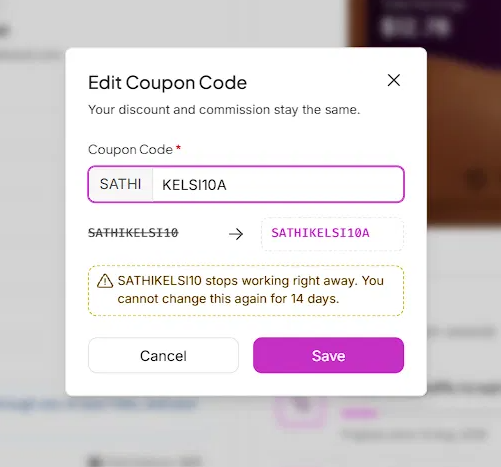

If Your Code Has a Locked Part
Some brands add their name to the start of every code. This part appears greyed out and can't be changed. You can only edit the part after it.
What Happens to Your Old Code

Your new code shows up straight away in Your Discount Codes.
How Often You Can Edit
You can edit your code once every 14 days. After you save a change, editing is locked until the 14 days are up.
Still need help?
Reach out anytime to our Support team using the button at the bottom-right corner of your dashboard, or email us at [email protected].