Email templates let you manage your program without writing every email from scratch. SATHI includes a set of pre-built system templates tied to key program workflows, and you can also create your own custom templates. All template content is editable, so you can match it to your brand's tone.
Go to Settings
Click General
Open Email Templates
From here you can view all available templates and edit their content.
System templates are pre-built by SATHI to support key program workflows.

Code Leak – Code Deleted: A discount code is deactivated due to a suspected code leak
Geo Signals Traffic Removal: An ambassador is removed due to a geo traffic mismatch
Paid Ads Abuse Removal: An ambassador is removed for a paid ads violation
Paid Ads Abuse Warning: A warning is sent for paid ads activity
Traffic Quality Warning: A warning is sent for suspicious traffic patterns
Application & Onboarding
Dashboard Access Link: An ambassador is onboarded
Application Approved – Affiliate Link: An application is approved with an affiliate link
Application Approved – Affiliate Link & Code: An application is approved with a link and a code
Application Approved – Free Product: An application is approved with a product perk
Application Rejected: An application is rejected
Application Thank You: An application is successfully submitted
Incomplete Application Reminder: An applicant hasn't finished their application
Activation & Engagement
Awaiting First Post: An ambassador hasn't shared their first post yet
Inactive Ambassador: No activity for a set period
Inner Circle Follow-Up: An ambassador joins your inner circle
Invite Ambassador: Manually invite someone to your program
Performance & Insights
Low Reach: Posts are getting low engagement
Low Conversion: Referrals are not converting well
Payouts
Payout Confirmation: A commission is successfully processed
Inside Insights → Ambassadors Needing Attention, you'll see ambassadors who may need a follow-up.
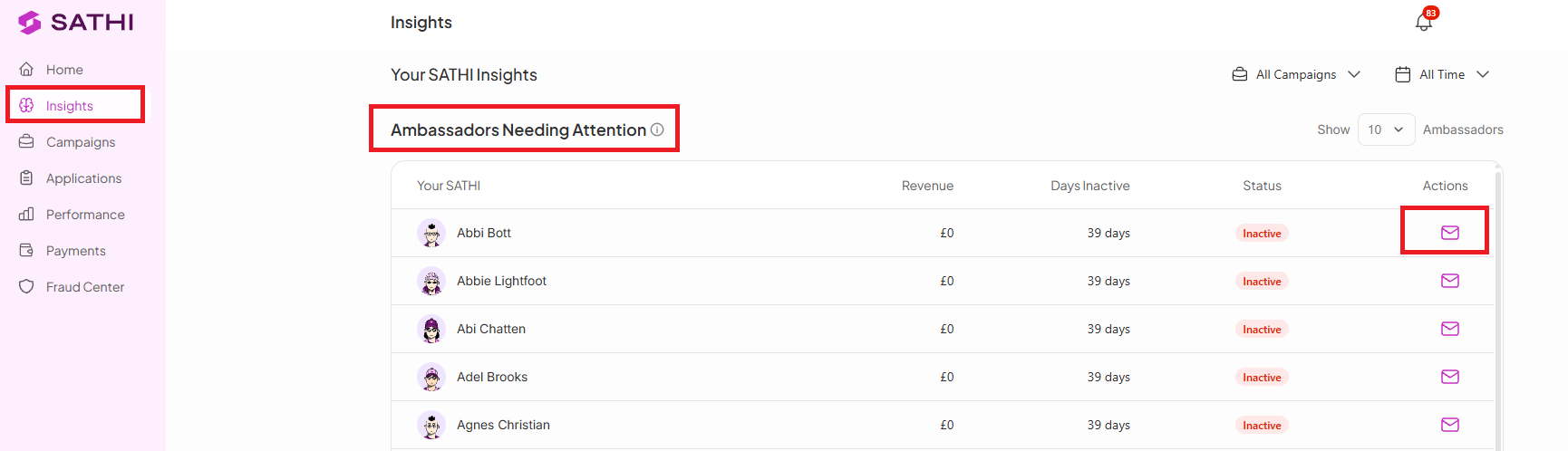
Click the inbox icon next to an ambassador to send them the Inactive Ambassador template directly — no manual drafting needed.
You can also create your own templates for more control over your messaging. Brands typically set up custom templates for:
Brand-specific messaging
Campaign announcements
Seasonal updates
VIP ambassador communication
Pre-built system templates keep program communication consistent and remove the need to draft routine messages for every workflow trigger. Custom templates extend that same efficiency to brand-specific or one-off communication, so your messaging stays on-brand without added manual work.
Still need help?
Reach out anytime to our Support team using the button at the bottom-right corner of your dashboard, or email us at [email protected].