

Ambassador payouts are processed through the Tremendous app and require a funded SATHI wallet. Auto-Refill lets you set a balance threshold and a top-up amount, and SATHI adds funds automatically whenever your wallet drops below that threshold. This keeps payouts running without manual monitoring.
How Auto-Refill Works
You set two values:
Threshold — the balance that triggers a top-up
Refill amount — how much SATHI adds when the threshold is hit
For example, if your threshold is $200 and your refill amount is $1,000, SATHI adds $1,000 to your wallet as soon as your balance drops below $200.
How to Enable Auto-Refill
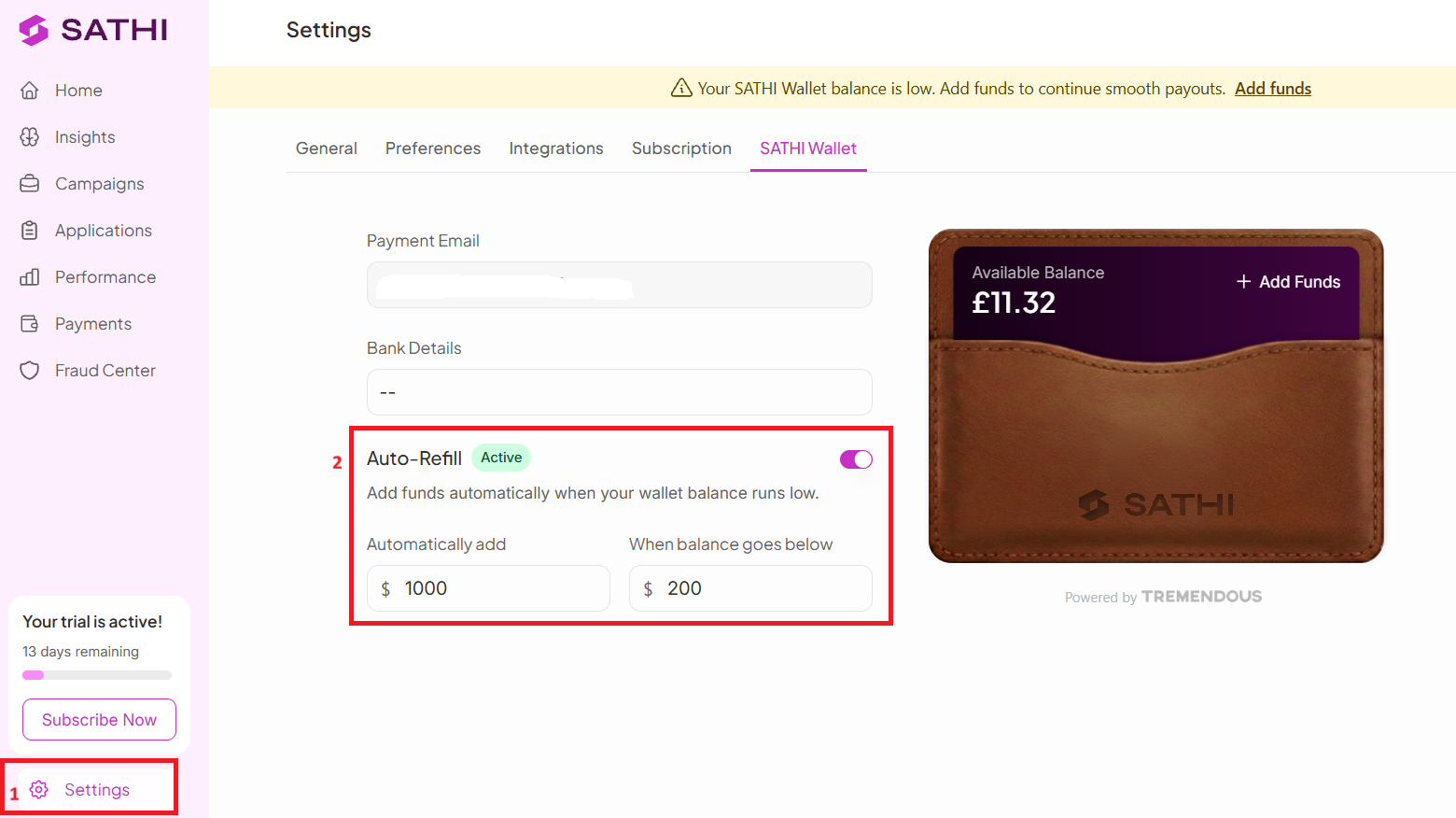
Navigate to Settings.
Go to SATHI Wallet.
Turn on Auto-Refill.
Set your:
Threshold amount
Top-up amount
Your wallet will now refill automatically whenever the balance drops below your threshold.

Why This Is Important
A low wallet balance can pause ambassador payouts until funds are added manually. Auto-Refill removes that risk by keeping the wallet funded automatically, so payouts stay on schedule and your team doesn't need to monitor the balance to catch a shortfall before it affects ambassadors.
Still need help?
Reach out anytime to our Support team using the button at the bottom-right corner of your dashboard, or email us at [email protected].