Keep your affiliates motivated and posting consistently by rewarding them when they hit milestones that matter to your program.
SATHI's Gamification lets you set up automatic rewards tied to real performance, sales, orders, traffic, posts, or just showing up. When an affiliate hits a goal, SATHI handles the reward and the communication for you.
Click Campaigns in the left sidebar and select the campaign you want to set up rewards for. In the top-right corner, click Customize, then open the Gamification tab.
If no rewards exist yet, you'll see an Enable Gamification button. Click it and a modal will appear to create your first reward.
If you've already set up rewards before, skip to the next step — you can add more by clicking + New Reward in the top-right of the tab.
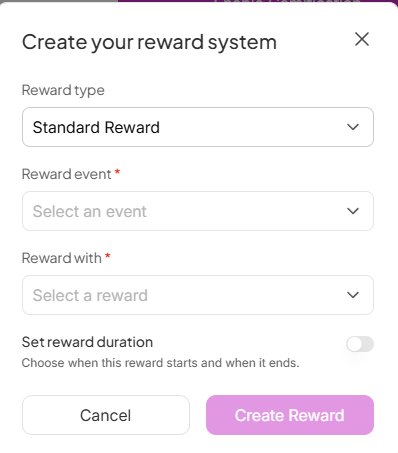
The Create your reward system modal has four sections:
Reward Type — choose what triggers the reward:
Standard Reward: Available to all ambassadors
Booster reward: Applicable only in the first X days since an ambassadors joins the program. Use this to boost initial activation.
Reward Event — choose what triggers the reward:
Crosses $X in sales: enter the sales threshold
Brings more than #Y orders: enter the number of orders
Brings X amount of traffic: enter the number of clicks
Posts X times: enter the number of posts
Posts X times every Y period: enter the post count and time window
Invite Accepted: fires automatically when an ambassador joins the program
Reward With — choose what the affiliate earns:
Flat $X bonus: enter the cash amount
Upgrade Commission Tier: automatically move them to a higher tier when they qualify
Free Product: search for a product, select the variants, and SATHI ships it once approved
Make the reward time bound (Set reward duration) — toggle this on if you want the reward to run for a limited period. Set an end date and SATHI will stop the reward automatically when it expires.

Once you're happy with the setup, click Create Reward.
As soon as a reward is created, every ambassador in that campaign receives an email letting them know about it and what they need to do to earn it.
Their dashboard also shows a Rewards section with a progress bar for each active goal — so they always know exactly where they stand and what they're working toward.
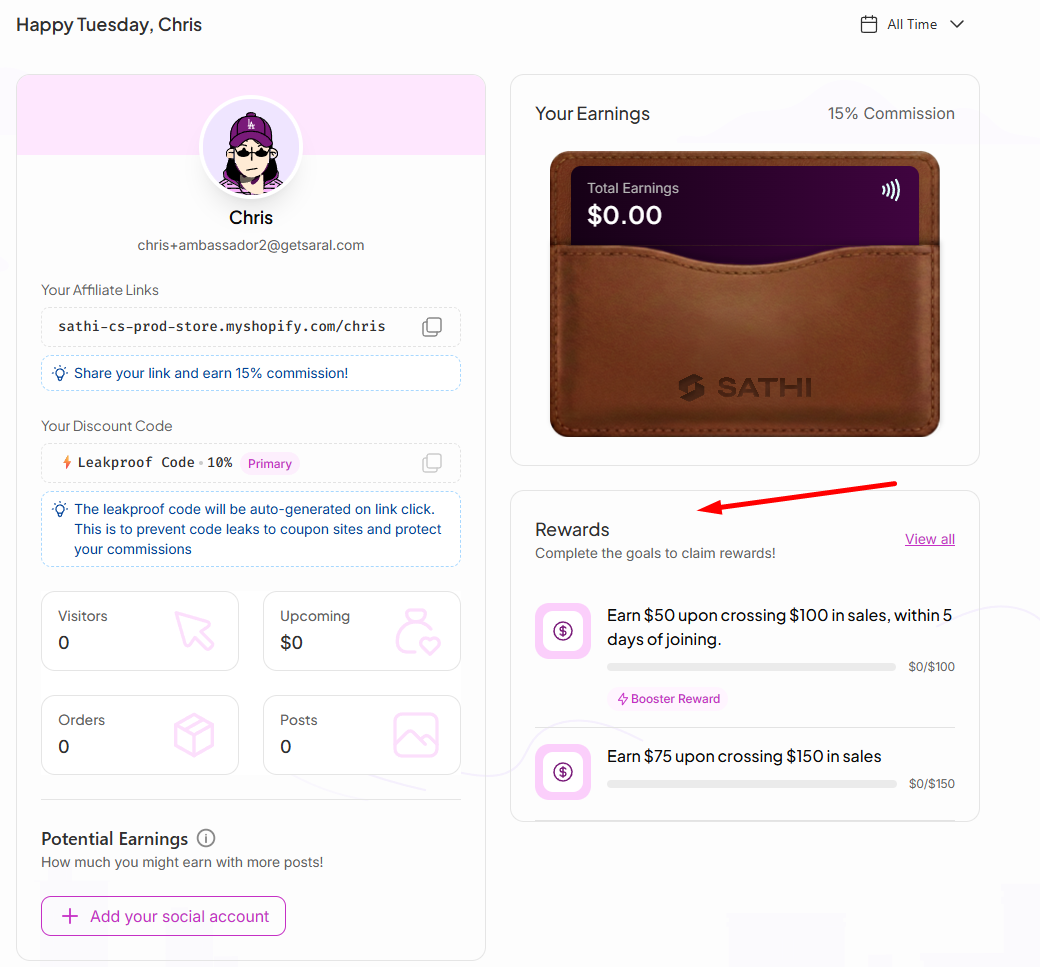
SATHI tracks progress automatically from there. No manual follow-up needed.
All your active rewards are listed on the Gamification tab. From here you can:
Edit a reward — update the event trigger, reward type, or end date
Pause a reward — temporarily disable it without deleting it
Delete a reward — remove it permanently
View Reward History — see which affiliates have already triggered and claimed rewards
Still need help?
Reach out anytime with our Support team using the button at the bottom-right corner of your dashboard, or email us at [email protected].

