Track exactly where your affiliate traffic is coming from, automatically.
UTM parameters are tags added to the end of a URL that tell your analytics tool (like Google Analytics) where a visitor came from, what channel brought them, and which campaign they were part of. When enabled in SATHI, these tags are added to every affiliate link automatically, so you get clean attribution data without any manual work from your affiliates.
Go to Campaigns in the left sidebar, select your campaign, and click Customize in the top-right. Open the Preferences tab and you will see Add UTM Parameters. The toggle is ON by default.
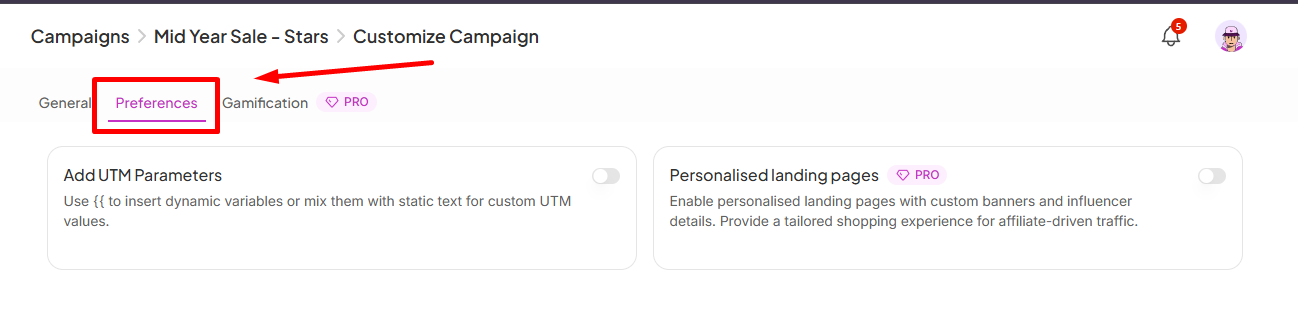
SATHI gives you three fields to configure:
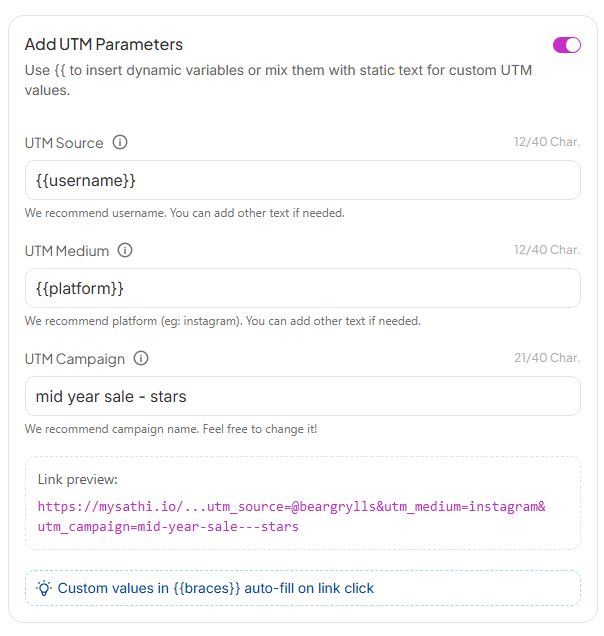
UTM Source
Identifies who sent the traffic. SATHI recommends using {{username}} so each affiliate's link is automatically tagged with their username. You can mix in static text alongside the variable if needed.
UTM Medium
Identifies the channel. SATHI recommends {{platform}} so links are tagged with the affiliate's platform (e.g. instagram, tiktok). You can customize this with static text too.
UTM Campaign Identifies the campaign. SATHI pre-fills this with your campaign name, but you can change it to anything that makes sense for your tracking setup.
A Link preview at the bottom updates in real time so you can see exactly what a tagged affiliate link will look like before saving.

{{double braces}} are dynamic variables, it auto-fills with the affiliate's real data at the moment they click the link. Static text stays the same for every affiliate in the campaign. You can see all available variables by typing two curly braces "{{" in one of the empty fields.Still need help?
Reach out anytime with our Support team using the button at the bottom-right corner of your dashboard, or email us at [email protected].

