

UTM parameters are tags added to the end of a URL that tell your analytics tool, like Google Analytics, where a visitor came from, what channel brought them, and which campaign they were part of. When enabled in SATHI, these tags are added to every ambassador link automatically, so you get clean attribution data without any manual work from your ambassadors.
Setting Up Your UTM Fields
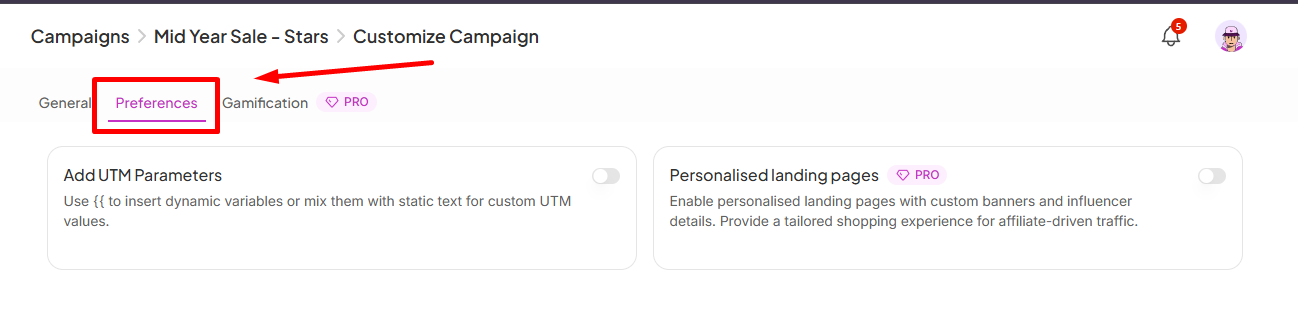
Go to Campaigns in the left sidebar, select your campaign, and click Customize in the top-right. Open the Preferences tab and you'll see Add UTM Parameters. The toggle is on by default.
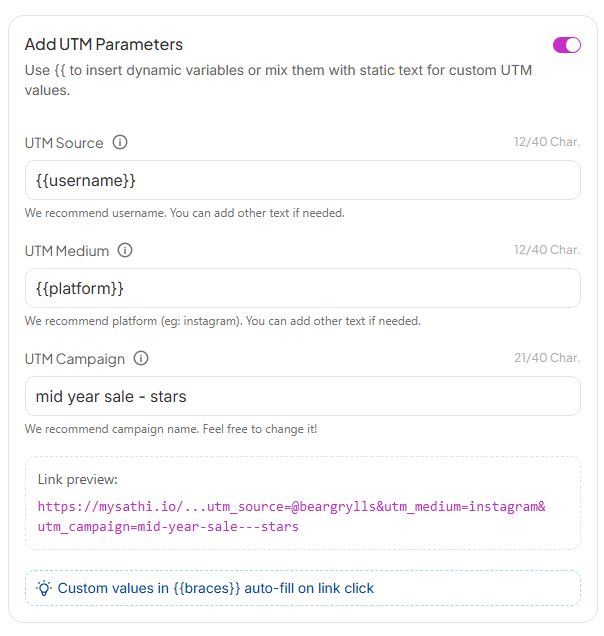
SATHI gives you three fields to configure:
UTM Source: Identifies who sent the traffic. SATHI recommends using {{username}} so each ambassador's link is automatically tagged with their username. You can mix in static text alongside the variable if needed.
UTM Medium: Identifies the channel. SATHI recommends {{platform}} so links are tagged with the ambassador's platform (e.g. Instagram, TikTok). You can customize this with static text too.
UTM Campaign: Identifies the campaign. SATHI pre-fills this with your campaign name, but you can change it to anything that makes sense for your tracking setup.
A link preview at the bottom updates in real time so you can see exactly what a tagged ambassador link will look like before saving.

{{double braces}} are dynamic variables that auto-fill with the ambassador's real data at the moment they click the link. Static text stays the same for every ambassador in the campaign. You can see all available variables by typing two curly braces "{{" in one of the empty fields.Why This Is Important
Without UTM tracking, attributing traffic to specific ambassadors, platforms, or campaigns in your analytics tool requires manually tagging every link. Because SATHI fills in dynamic variables like username and platform automatically, every ambassador's link comes pre-tagged with clean, consistent data the moment it's shared, giving you accurate channel-level attribution without asking ambassadors to do anything differently.
Still need help?
Reach out anytime to our Support team using the button at the bottom-right corner of your dashboard, or email us at [email protected].