Once your SATHI Wallet is set up and funded, you can manage and send all pending affiliate commissions from the Payments section in the left sidebar.
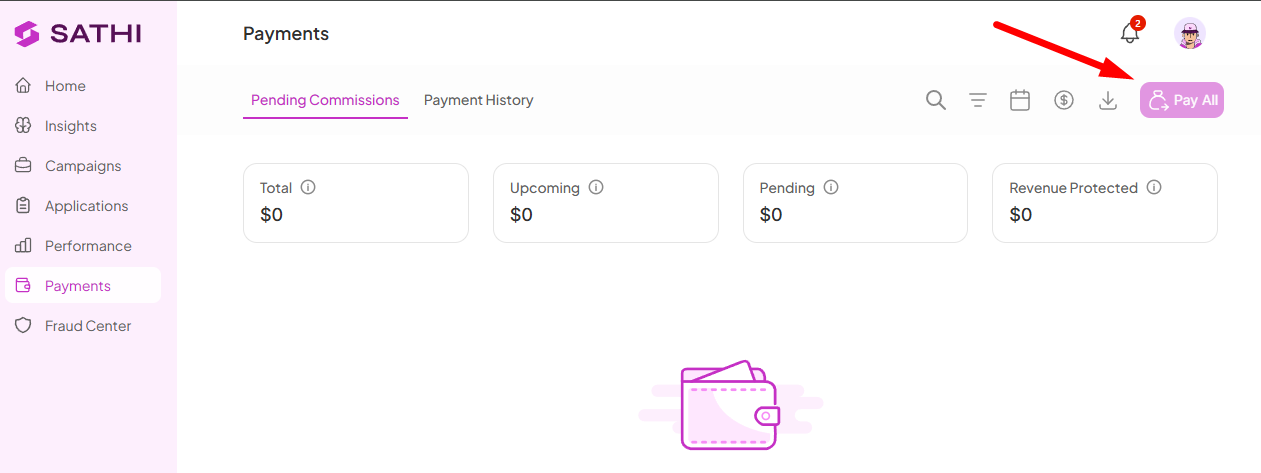
At the top of the Pending Commissions tab, you'll see three summary metrics:
Total: The total value of all commissions currently owed across your program
Upcoming: Commissions that are scheduled but not yet due for payment
Pending: Commissions that are ready to be paid out now
Revenue Protected: Revenue flagged as fraudulent and protected.
To pay every affiliate with a pending commission in one go, click the Pay All button in the top-right corner of the page. A confirmation modal will appear before anything is processed — review the details and confirm to send all payments at once.
If you want to pay specific affiliates rather than everyone at once:
Check the boxes next to the affiliates you want to pay
A toolbar will appear at the bottom of the screen showing how many are selected
Click Pay All (X) in the toolbar to send payments to the selected affiliates only
Confirm in the modal that appears
From the same toolbar you can also:
Select All — select every affiliate on the page at once
Reject All (X) — reject the selected commissions
Export Data (X) — download the selected commission data
Download Invoices (X) — download invoices for the selected payments
Once a payment is sent, the affiliate receives an email notification letting them know their commission is on its way. You can review all past payments at any time by clicking the Payment History tab at the top of the page.
Tip: Keep an eye on the low balance banner at the top of the page. If your SATHI Wallet balance is running low, some payments may stay pending until you add funds. Head to Settings > SATHI Wallet to top up.
Still need help?
Reach out anytime with our Support team using the button at the bottom-right corner of your dashboard, or email us at [email protected].

