SATHI lets you import an existing ambassador list using a CSV file. The platform automatically detects and maps your columns, so you don't need to reformat your file or match column names manually. This is useful if you're moving from another affiliate platform or already track ambassadors in a spreadsheet.
You'll need a CSV file with your ambassador data. Two columns are required:
Name: First name, last name, or full name, in any format
Email: Used as the unique identifier for each ambassador
Everything else is optional. SATHI also accepts: Traffic, Revenue, Commissions, Address, Country, Instagram, TikTok, YouTube, and Website. Column names don't need to match exactly.

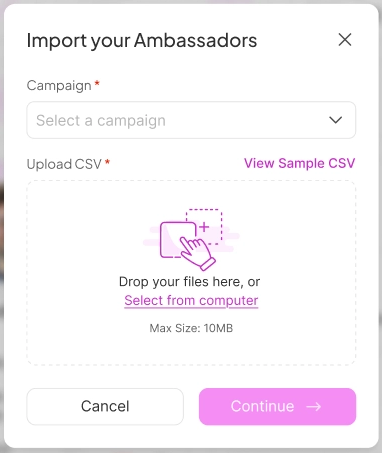
Go to Campaigns in the left sidebar and click Import. Select the campaign you want to import ambassadors into, then upload your file by dragging it in or selecting it from your computer.
Once your file is uploaded, SATHI reads your column headers and a sample of your data to determine how each column should be mapped. This process typically takes 1–3 seconds, and no action is needed on your end.
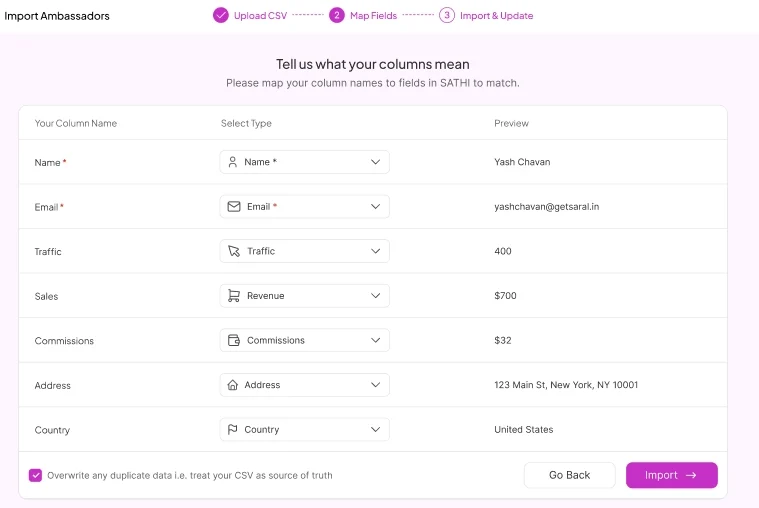
After mapping is complete, a confirmation screen shows:
How many ambassadors are ready to import
How many already exist in SATHI
How your columns have been mapped
If SATHI is unsure about a column, it flags it for you to confirm or skip.
Updating existing ambassadors: This screen includes a toggle labeled Update existing ambassadors with new data.
Off (default): SATHI only fills in empty fields for existing ambassadors. Existing data is not overwritten.
On: SATHI overwrites all fields for existing ambassadors with the data from your file.
Once you've reviewed the mapping, click Import.
The import processes in the background, so you don't need to wait for it to finish. You'll receive a notification once it's complete. To check status at any time, click the Notifications bell at the top of your profile.
Once your ambassadors are imported, assign them to a campaign to get them active. See the Help Center articles on setting up your affiliate program and creating an ambassador application form for next steps.
Importing an existing ambassador list saves you from manually re-entering ambassador data or rebuilding relationships from scratch. Automatic column mapping removes the need to reformat spreadsheets to match a specific template, and the update toggle gives you control over whether new data overwrites what's already in SATHI.
Still need help?
Reach out anytime to our Support team using the button at the bottom-right corner of your dashboard, or email us at [email protected].

