

Adding a teammate to your workspace takes a few steps and gives you control over who can access what. This guide covers how to send an invite, the roles available, and a login issue that trips up new users.
How to Invite a Team Member
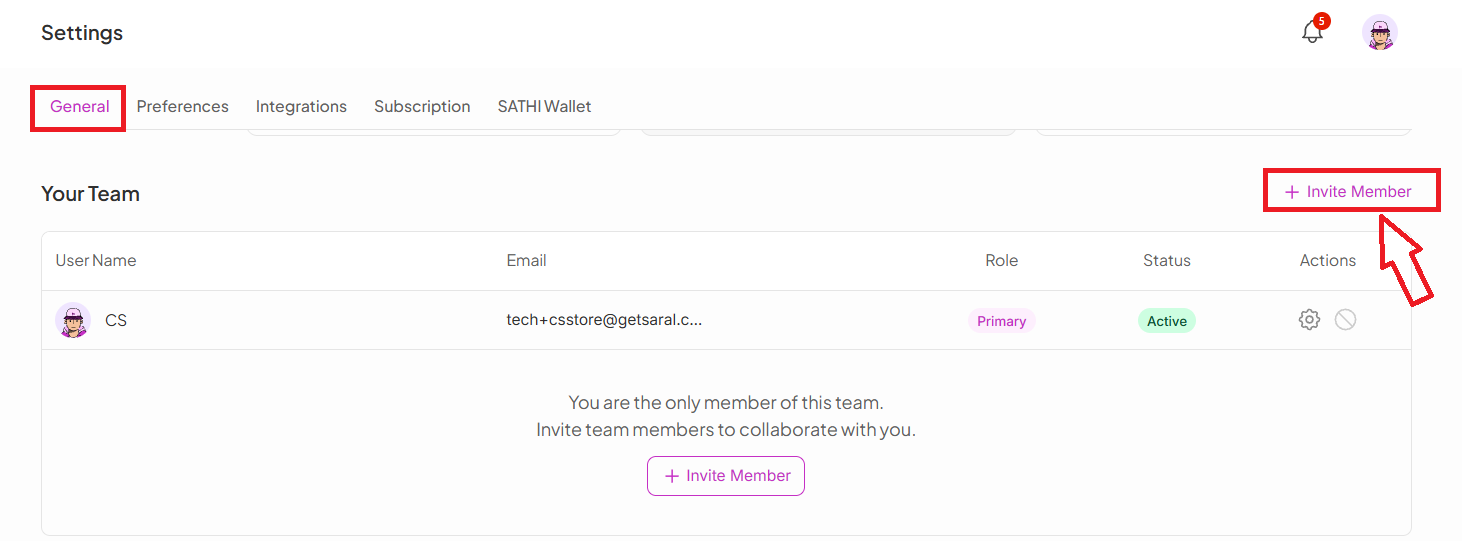
Go to Settings
Click General
Under Your Team, select Invite Member
Enter the team member's email address
Click Send Invite
Your teammate receives an email invitation to set up their account and join your workspace.
Avoiding a Common Login Mistake

Instead:
Select Sign in with Email
Use the credentials you created during setup
This ensures you log into the correct SATHI profile without access issues.
User Roles
Primary User
Full access to the platform
Can invite or revoke access for any user
Can assign or change roles, including promoting someone to Primary
Team Member
Can view and use the platform
Has full access to create campaigns, invite ambassadors, and manage payouts
Why This Is Important
Bringing your team onto SATHI means campaigns, payouts, and ambassador management don't bottleneck through one person. Assigning the right role from the start keeps sensitive actions, like revoking access or changing roles, limited to the people who should have that control.
Still need help?
Reach out anytime to our Support team using the button at the bottom-right corner of your dashboard, or email us at [email protected].