Email templates in SATHI both Custom and System Templates now give you more flexibility in managing replies.
Instead of all responses going back to the primary email address of your SATHI account, you can now choose a specific team member’s email or any custom reply-to email address. This ensures replies go directly to the right person or inbox, making communication smoother and more organized.
With this update, you can:
Assign different reply-to emails per template
Route influencer replies to the right team member
Avoid clutter in a single shared inbox
Keep communication more structured across your team
Even if the email is sent from [email protected], replies will go to the email address you’ve set.
Follow these simple steps:
Go to Settings
Navigate to General > Email Templates
Open any System Template or Custom Template (e.g., Gamification – Reward is Live)
Click the Edit icon
Open the template
Find Reply to Email
Click Add Custom Email
Select or enter the email address you want replies to go to
Click Save
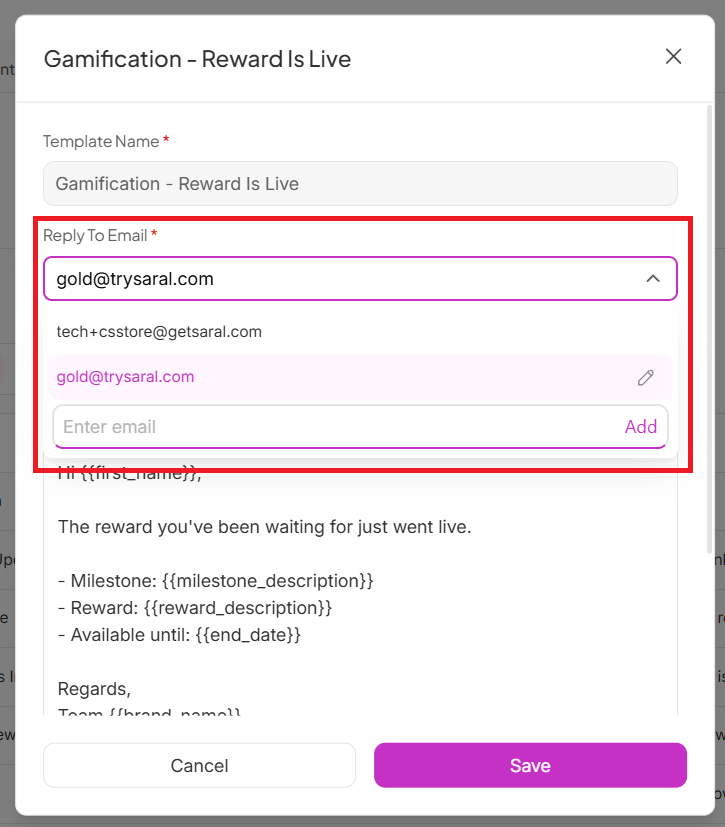
Once configured:
The influencer will receive the email from [email protected]
But when they hit reply, the response will go directly to the custom reply-to email you selected
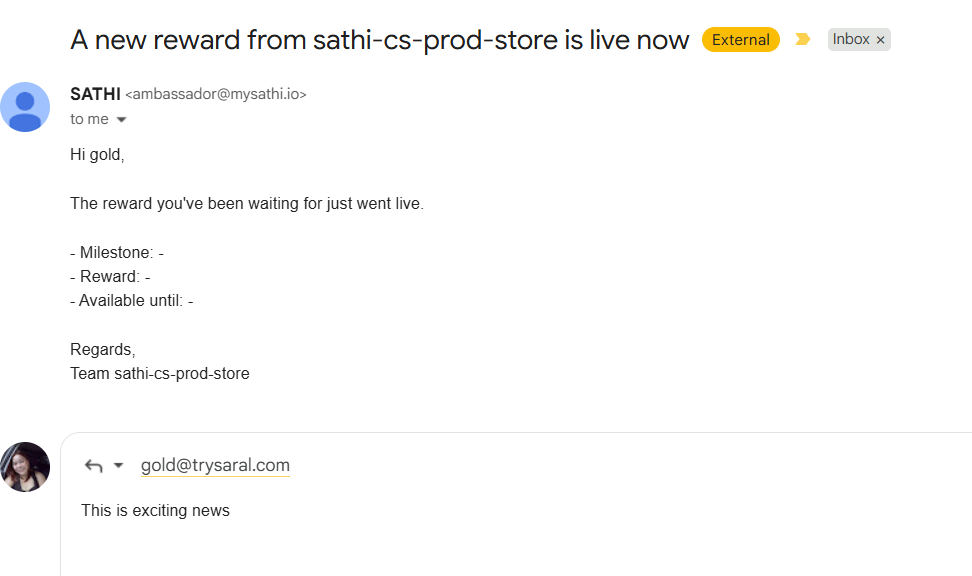
This helps ensure the right team member gets the right conversations without manual forwarding or confusion.
Still need help?
Reach out anytime to our Support team using the button at the bottom-right corner of your dashboard, or email us at [email protected].