

Setting up each campaign from scratch takes time, especially when running multiple ambassador programs. SATHI's Duplicate Campaign feature lets you clone an existing setup instantly, so you can launch new campaigns faster and with less effort.
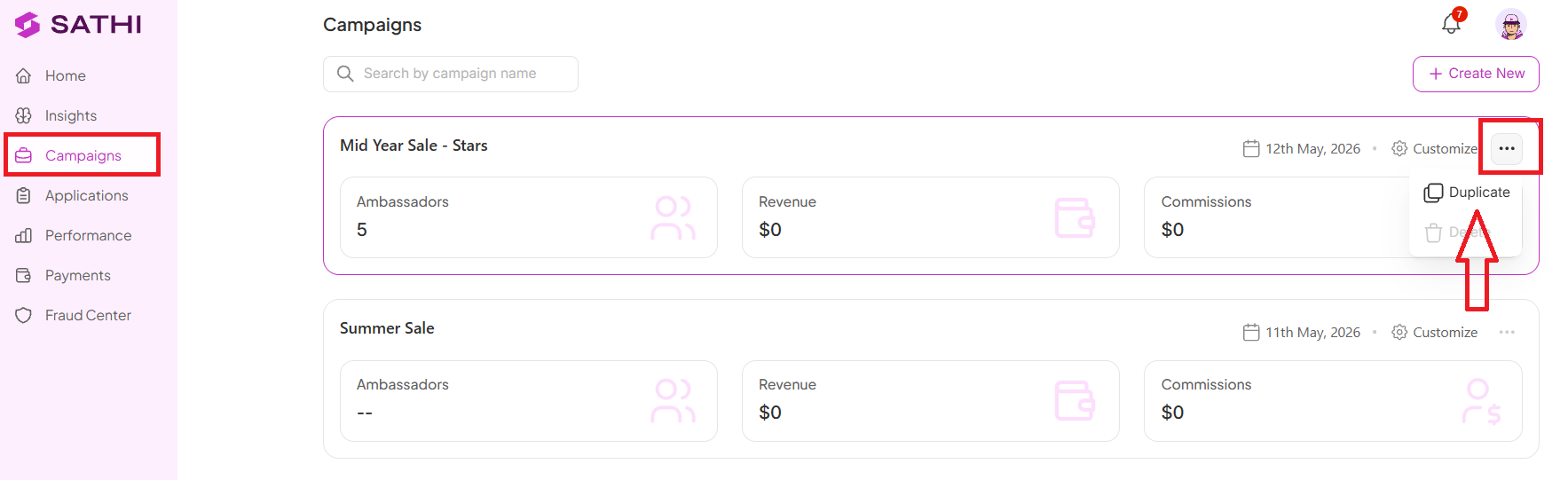
What Gets Copied
When you duplicate a campaign, SATHI automatically carries over your key configurations:
Commission tiers
Discount templates
UTMs and tracking links
Gamified rewards
Application form
This means your campaign structure is ready in seconds. No rebuilding needed.
What Does Not Get Copied
To keep each campaign clean and accurate, the following are not duplicated:
Ambassadors
Performance data
Applications
Each duplicated campaign starts fresh with new ambassadors and new results.
What Happens After Duplication
Once your campaign is duplicated, you can immediately move forward with onboarding creators:
Invite ambassadors manually, or
Import ambassadors via CSV (if available in your setup)
Why This Is Important
Duplicating a campaign lets you reuse a proven setup instead of rebuilding commission tiers, discount templates, and rewards from scratch each time. This reduces manual setup work and errors, and makes it faster to scale a winning program across multiple campaigns while keeping them consistent.
Still need help?
Reach out anytime to our Support team using the button at the bottom-right corner of your dashboard, or email us at [email protected].