Seeing your first commission come through is exciting, and naturally, the next question is "how do I withdraw it?" The good news is that the process is simple, automated, and designed to get your rewards to you as quickly as possible.

Once your commission has been approved and paid, you’ll receive a Payout Confirmation email from [email protected] and an email from Tremendous with instructions on how to redeem your payout and choose from the available reward options.
But first:
In your personal dashboard, the Upcoming section shows the amount currently owed to you by the brand.
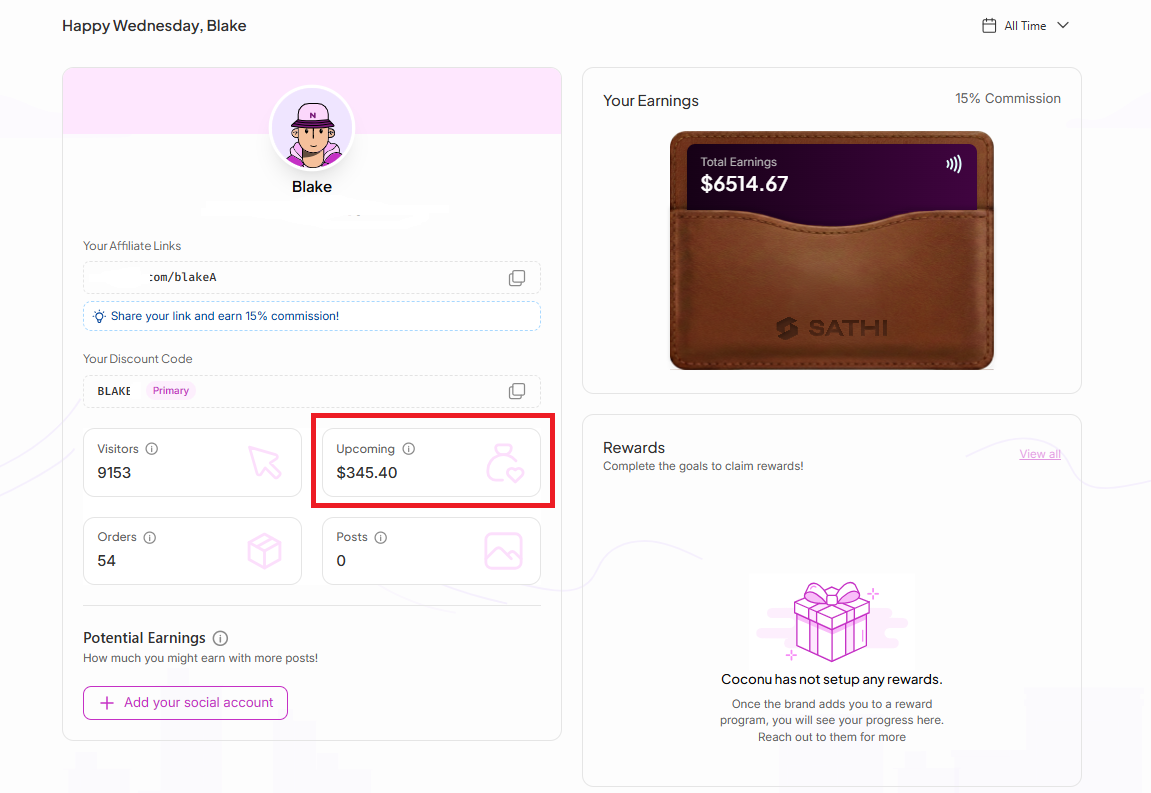
Before commissions are paid out, the platform automatically reviews them based on the brand’s return window and payout rules.
Once your commission has been approved and settled by the brand, your payout will be processed through Tremendous.
Once your commission has been processed by the brand, you’ll receive a separate email from [email protected] sent to your registered email address. This email will include instructions on how to claim your payout.
Here’s how to check:
Step 1: Locate the Email
Check your inbox for an email from [email protected].
If you don't see it right away, be sure to check:
Spam or Junk folder
Promotions tab
Search your inbox for a subject line similar to:
"[Brand Name] sent you $XX.XX"
Step 2: Open the Email
Open the email and review the payout details.
Step 3: Click “Redeem”
Select the Redeem button inside the email.
Step 4: Choose Your Reward
You'll be redirected to the redemption page, where you can view and select from the payout or reward options made available by the brand.
Tremendous processes payouts quickly, so there’s no long waiting period once your commission has been paid. Congratulations on your payout! 🎉
Now, you can monitor all commission activity directly from your personal dashboard.
Navigate to Payments Section
Here, you’ll find filters that help you track:
Pending or upcoming commissions
Paid commissions
The Paid Status view allows you to see which commissions have already been processed through Tremendous.
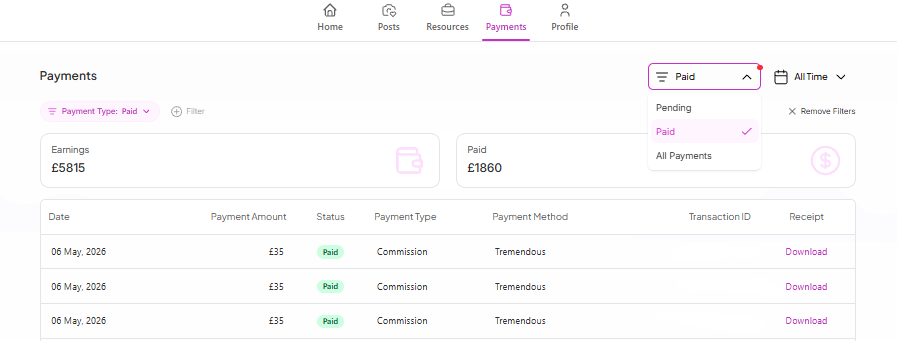
For easier tracking, you can also reference:
Payment dates
Transaction IDs
Payout history
This makes it easier to monitor your earnings and confirm completed payouts.
Knowing exactly where your commission stands, and how to redeem it once it's paid, means you're never left guessing about money you've earned. Because everything is automated through Tremendous, you can track pending and paid commissions yourself instead of having to follow up with the brand.
Still need help?
Reach out anytime to our Support team using the button at the bottom-right corner of your dashboard, or email us at [email protected].