Running a program with hundreds or thousands of ambassadors increases the chance that fraudulent or low-quality activity slips through unnoticed — coupon leaks, link manipulation, paid traffic abuse, or ambassadors purchasing their own products for commission. Fraud Center automatically detects this kind of activity, lets you review potential risks, and protects your commissions before payout.
The moment a commission is created, it passes through SATHI's fraud engine before it can become payable.
Self-Referrals — If an ambassador uses their own affiliate link or discount code to place an order, SATHI detects matching signals, such as an email match, and automatically rejects the commission. No manual action is required.
Return Window Protection — Every commission is held during your store's return window (default: 14 days). If the order is refunded during this period, the commission is automatically voided. Once the window closes without a refund, the commission becomes payable. You can adjust the return window from Settings → Preferences → Return Window & Payout Rules.
Multi-Identity Detection — Some users try to bypass self-referral checks by creating multiple identities. SATHI looks for patterns such as similar email addresses, shared billing information, or matching IP addresses across orders, and flags the commission for review when signals match.
Code Leak Detection — SATHI monitors where your discount codes appear across the internet, including coupon websites and browser extensions. If a code is used without a clear affiliate referral source, the activity is flagged so you don't pay commission on sales the ambassador didn't influence.
Geo Traffic Flood Detection — SATHI detects unusual traffic spikes coming from the same geographic location.
Paid Ads Signal Detection — SATHI detects when ambassadors may be running paid advertisements using your brand name or branded search terms.

The Overview page gives you a high-level view of flagged activity and overall program risk.

Top metrics:
Fraud Flags — the number of commissions waiting for your review, pulled from Commission Flags → Pending Review.
Ambassador Signals — the number of ambassadors showing potential risk indicators, such as code leaks, fake traffic, or ad abuse.
Commission at Risk — total commissions tied to open fraud flags and active risk signals, to review before payout.
Commission Protected — the total amount saved from rejecting fraud and blocking code leaks.
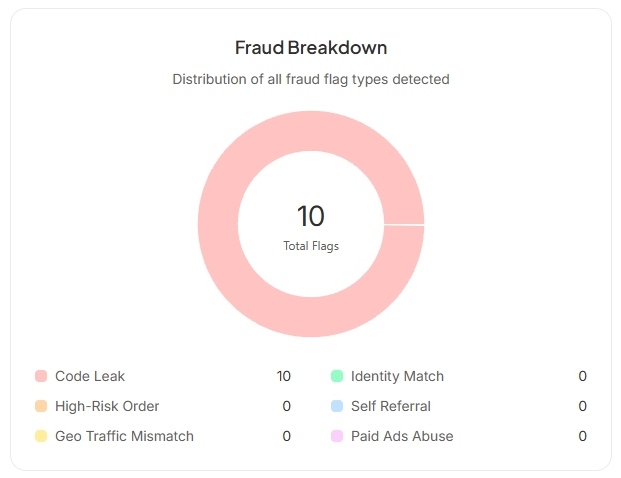
This section shows the distribution of fraud flags detected in your program — how many flags exist per fraud type, which issues are most common, and where to focus your attention first.
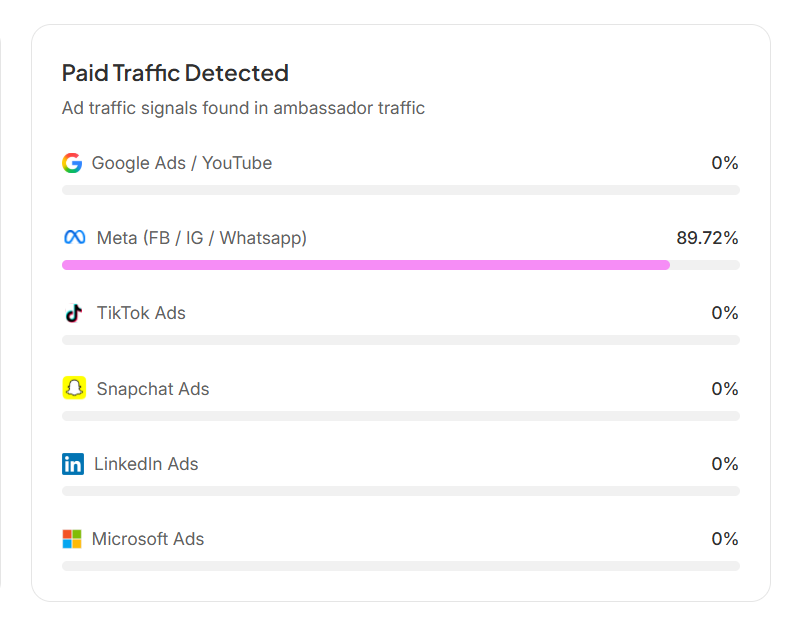
This section highlights which sources or sites are sending paid traffic, so you can see where most flagged traffic originates.
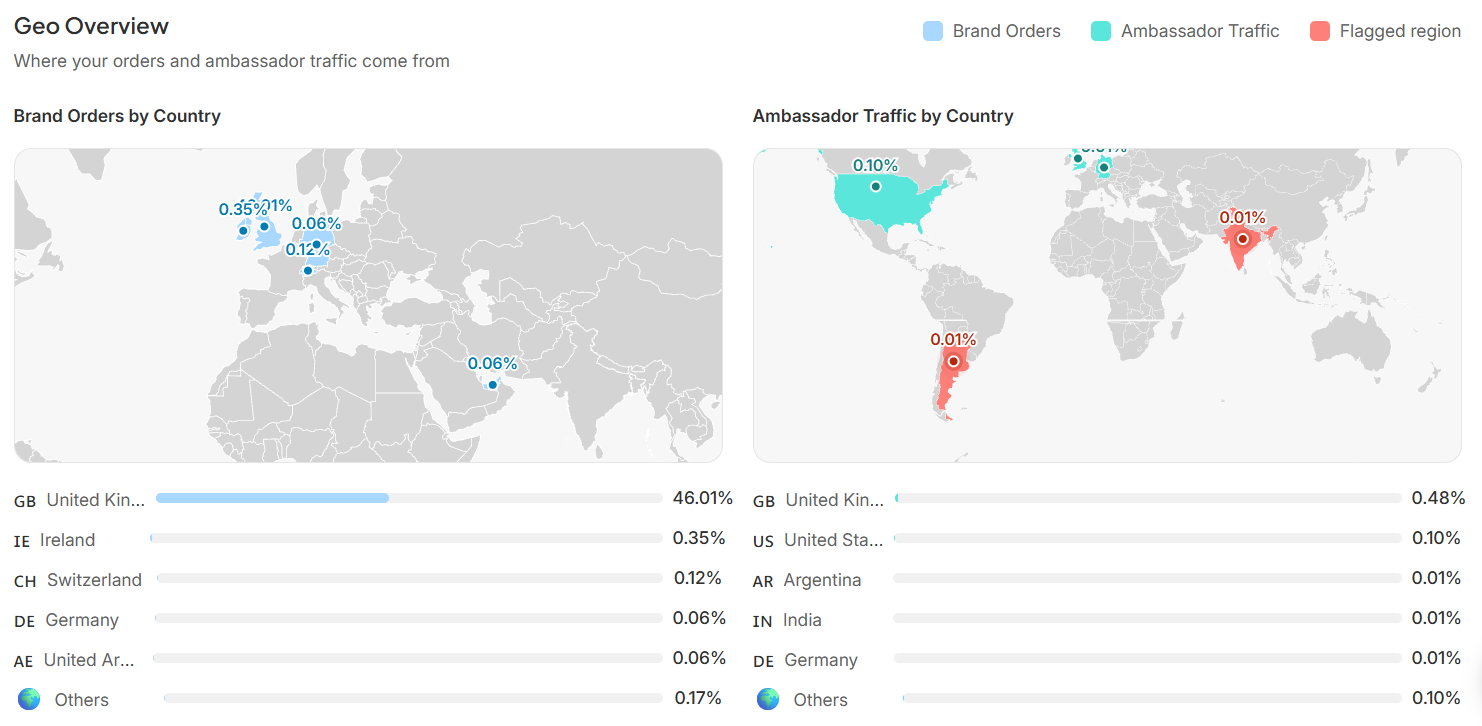
This section shows where your activity is coming from, split into three views: Brand Orders by Country, Ambassador Traffic by Country, and Flagged Regions. It's powered entirely by Shopify order data.
The maps are interactive — you can zoom, move, and explore specific regions for deeper insights.
All Fraud Center data can be filtered by date range:
Click the calendar icon.
Select your preferred date range.
Apply the filter.
Within Fraud Center, you can review:
Commission Flags — see the Help Center article on fraud flags and their meaning.
Paid Ads
Code & Link Leaks
Geo Signals
Fraud features vary depending on your SATHI plan.
Available on all plans (Ember and above):
Self-referral detection
Return window protection
Clawbacks
High-risk order flagging
Manual dispute handling
Available on Blaze and Wildfire only:
Multi-Identity Detection
Code Leak Detection
Geo Traffic Flood Detection
Paid Ads Signal Detection
Fraud Scan on Onboarding
Fraud Center protects your affiliate budget by catching invalid commissions before they're paid out, not after. Automatic detection handles the clearest cases without any manual work, while the review tools give you visibility into borderline activity so you can make informed decisions and keep your program's performance data trustworthy.
Still need help?
Reach out anytime to our Support team using the button at the bottom-right corner of your dashboard, or email us at [email protected].

