

Instead of creating marketing materials from scratch, ambassadors can rely on ready-to-use assets you provide. Supplying complete, accessible resources helps ensure brand consistency, reduces risks like copyright issues or off-brand messaging, and helps turn one-off promotions into long-term, high-performing relationships.
What Kind of Brand Resources Can Be Provided
Brands can upload a variety of helpful materials, including:
High-quality creative assets (images, videos, product photos)
FAQs, Campaign briefs and promotional guidelines
Brand guidelines (logos, colors, fonts, tone of voice)
Discount codes and promotional instructions
These materials help affiliates create more authentic, informed, and persuasive content which builds trust with their audience and improves performance.
How to Upload Brand Resources
Navigate to Campaigns
Click into the created campaign
Select the Upload Resources button
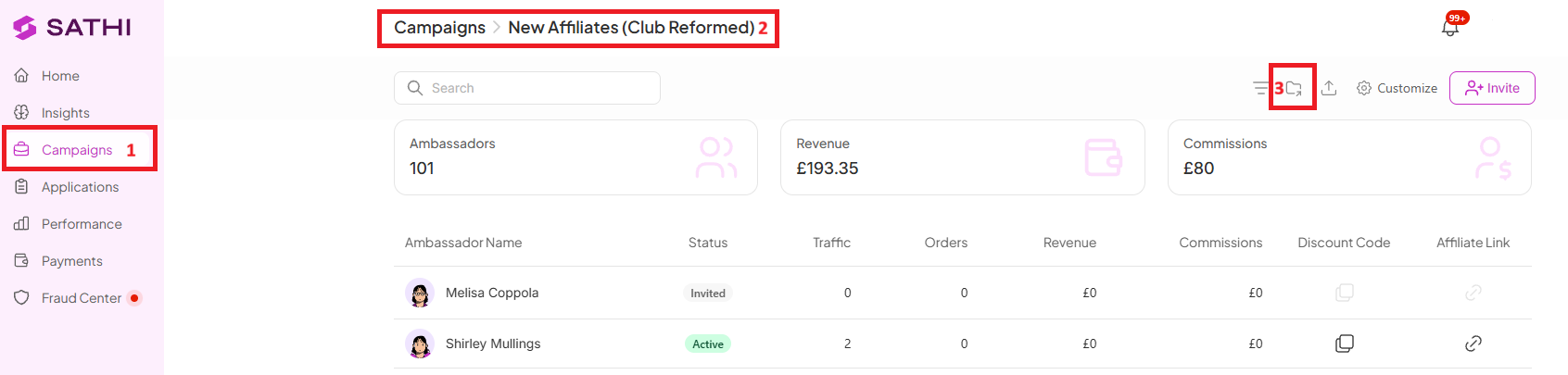
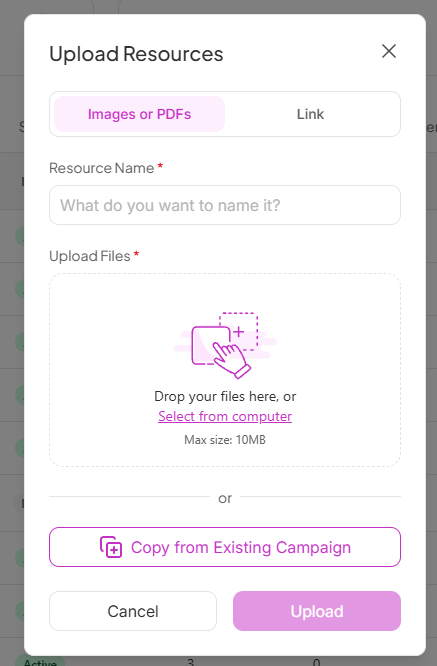
Add your files and follow the instructions on screen

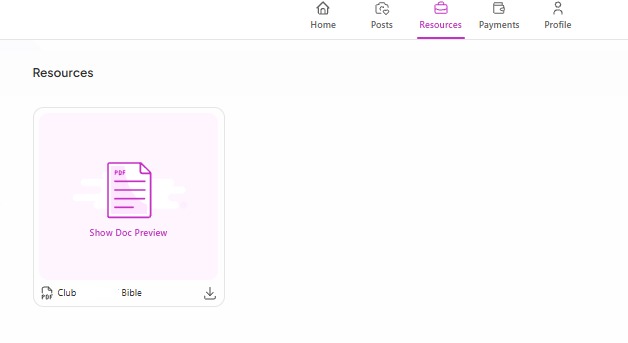
Once uploaded, affiliates will be able to access all campaign resources directly from their personal dashboard under the Resources tab.
Why This Is Important
Well-organized resources save ambassadors time and reduce the guesswork involved in creating content, which leads to more consistent, on-brand posts. It also gives ambassadors everything they need to represent your brand accurately, without needing to ask you for assets or approvals along the way.
Still need help?
Reach out anytime to our Support team using the button at the bottom-right corner of your dashboard, or email us at [email protected].