

SATHI's automated shipment feature lets you schedule recurring product shipments to your top-performing ambassadors without manually creating each order. This helps you support ambassadors, keep them supplied for ongoing promotions, and maintain strong ambassador relationships.
How to Set Up an Automated Shipment
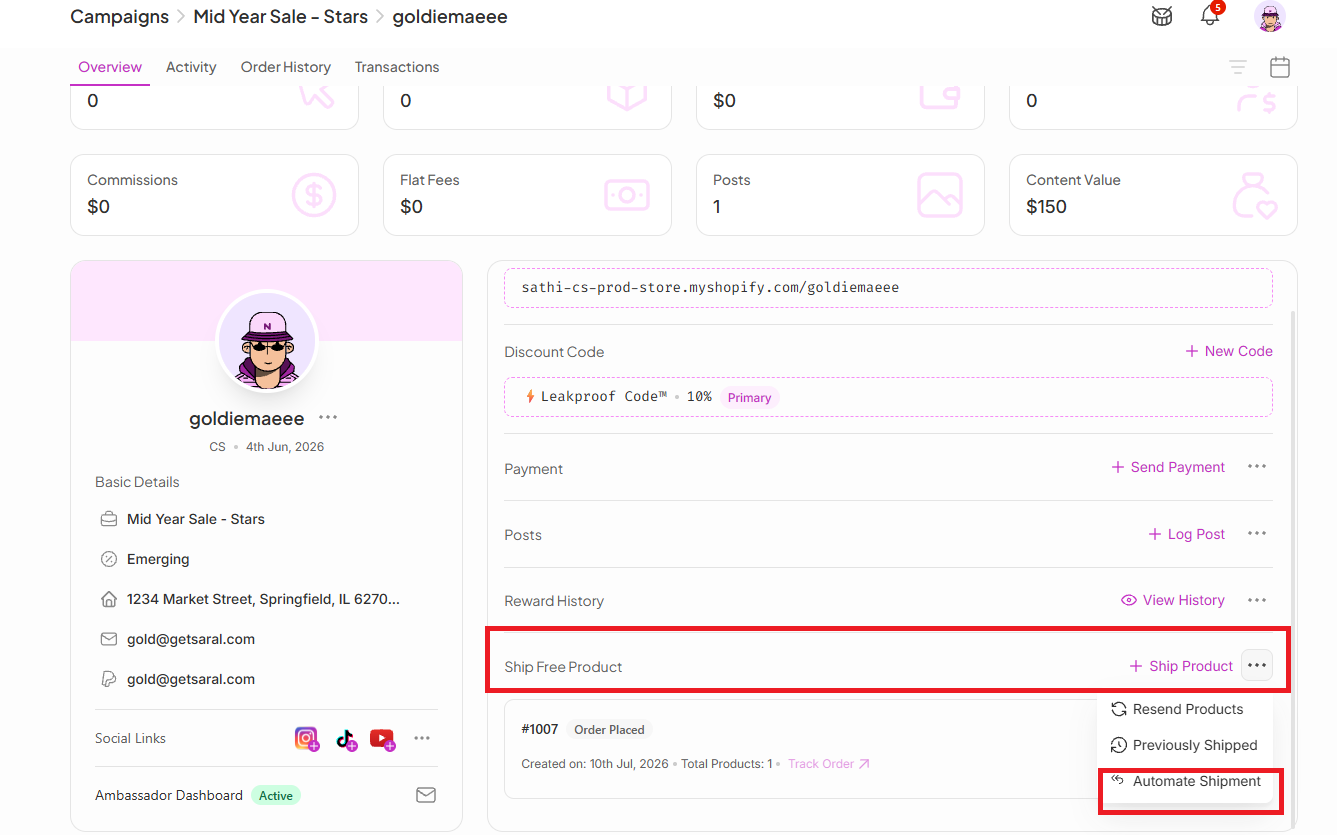
To create an automated gift shipment:
Go to the affiliate’s profile.
Find the Ship Product section.
Click the three-dot menu (⋯) or View Actions.
Select “Automate Shipment.”
Setting Up Your Automation Details
Before activating the automation, complete the following details:
Select the product
Search for the product you want to send, or
Choose from your Frequently Shipped products.
Choose the shipment frequency
Select how often you want the product to be sent to the affiliate (for example, every 30 days).
Set the automation end date
Choose how long you want the automation to continue.
The automation will run until the selected end date.
Once all details are confirmed, save your automation to activate it.

Why This Is Important
Automated shipments keep top ambassadors consistently supplied with product to create content and promote campaigns, without you having to remember to place each order manually. This saves time, reduces manual work, and helps build stronger long-term relationships with the ambassadors driving the most value.
Still need help?
Reach out anytime to our Support team using the button at the bottom-right corner of your dashboard, or email us at [email protected].