Commission Flags help you identify commissions that may need attention before payout. When SATHI's fraud engine detects suspicious activity, the commission is flagged and moved into Commission Flags inside the Fraud Center for your review — so instead of manually checking every order, you only need to look at the ones that need it.
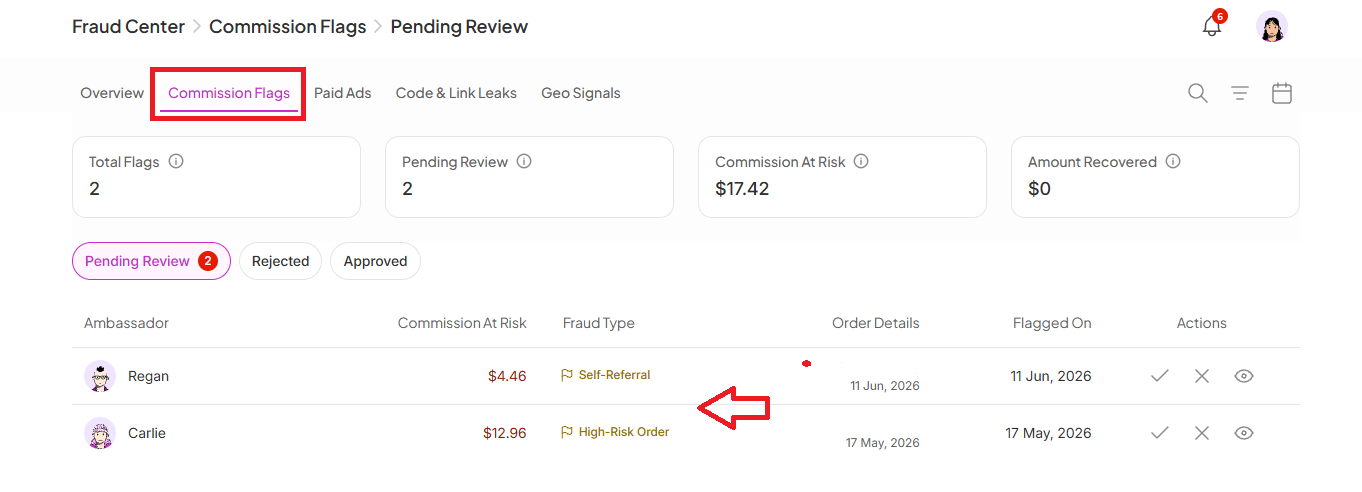
Whenever an ambassador earns a commission, SATHI runs it through fraud engine checks. If something looks unusual, the commission is flagged and moved into Commission Flags → Pending Review.
From there, you can:
Review what triggered the flag.
See the supporting evidence.
Approve legitimate commissions.
Reject suspicious commissions.
SATHI looks for several signals that may indicate suspicious activity:
High-Risk Order — Shopify identified the order as potentially risky based on its own fraud indicators.
Self-Referral — The customer email exactly matches the ambassador's email.
Refund After Payout — The order was refunded after the commission had already been paid.
Manual Dispute — A commission your team manually flagged for further review.
Email Match — The customer's email closely matches the ambassador's details.
Billing Match — The order's billing details closely match the ambassador's information.
IP Match — The order or clicks came from the same IP address connected to the ambassador's activity.

At the top of Commission Flags, you'll see a snapshot of what needs attention:
Total Flags — the total number of flagged commissions across all statuses: Pending Review, Approved, and Rejected.
Pending Review — commissions waiting for your decision.
Commission at Risk — the total commission value currently attached to unresolved flags, showing how much is waiting for review before payout.
Amount Recovered — the total commission value saved from rejected commissions.

Go to Fraud Center → Commission Flags.
Click Pending Review, check the evidence, then Approve or Reject.
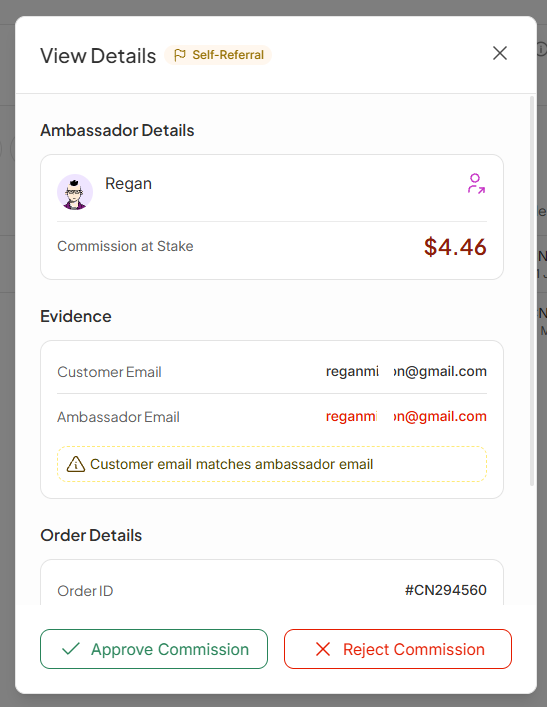
Rejecting a commission moves it to the Rejected tab. Approving it moves it to the Approved tab.
You can:
Search for an ambassador to find commissions connected to a specific person.
Filter by fraud type to focus on specific risks, such as self-referrals, identity matches, or High-Risk Orders.
Filter by date to review activity during a specific timeframe.
Commission Flags let you grow your ambassador program without trading protection for it. Suspicious commissions are surfaced automatically, so you spend less time investigating fraud manually and can reward genuine ambassadors with confidence, while stopping questionable payouts before they leave your wallet.
Still need help?
Reach out anytime to our Support team using the button at the bottom-right corner of your dashboard, or email us at [email protected].

