

The Seeding Cost Tracker gives you a clear, accurate view of product and shipping costs for every item you seed to creators. It pulls cost data automatically where possible, and lets you fill in the gaps manually, so your ROI calculations stay reliable across all campaigns and payouts.
How Costs Are Tracked Automatically
Your Cost of Goods (COGS) and shipping costs are pulled automatically from Shopify for every product sent through SATHI. No setup is required if this data already exists in Shopify.
Adding Product Costs Manually
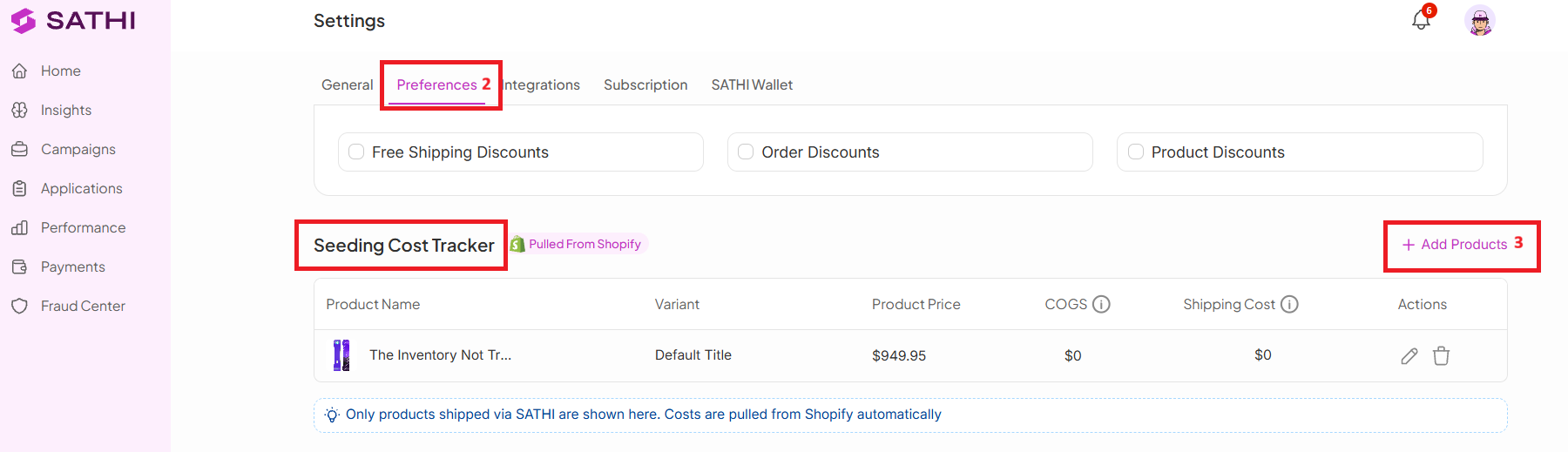
If COGS isn't set up in Shopify, or the data is missing or outdated, you can enter or edit product cost and shipping fees directly in SATHI.
To add a product manually:
Go to Settings
Navigate to Preferences
Head to Seeding Cost Tracker
Click Add Products
Select a product from your list

Why This Is Important
Accurate cost data is what makes your seeding ROI numbers trustworthy. Without it, cost gaps or outdated Shopify data can quietly skew your reporting across every campaign that involves seeded products.
Still need help?
Reach out anytime to our Support team using the button at the bottom-right corner of your dashboard, or email us at [email protected].