

Real Performers is where Prism gets actionable. It's a sortable table showing every ambassador's attributed revenue under both last-click and multi-touch attribution, so you can see exactly who's gaining credit, who's losing it, and by how much. This article walks through the callout banner and each column in the table.
The Hidden Performers Callout
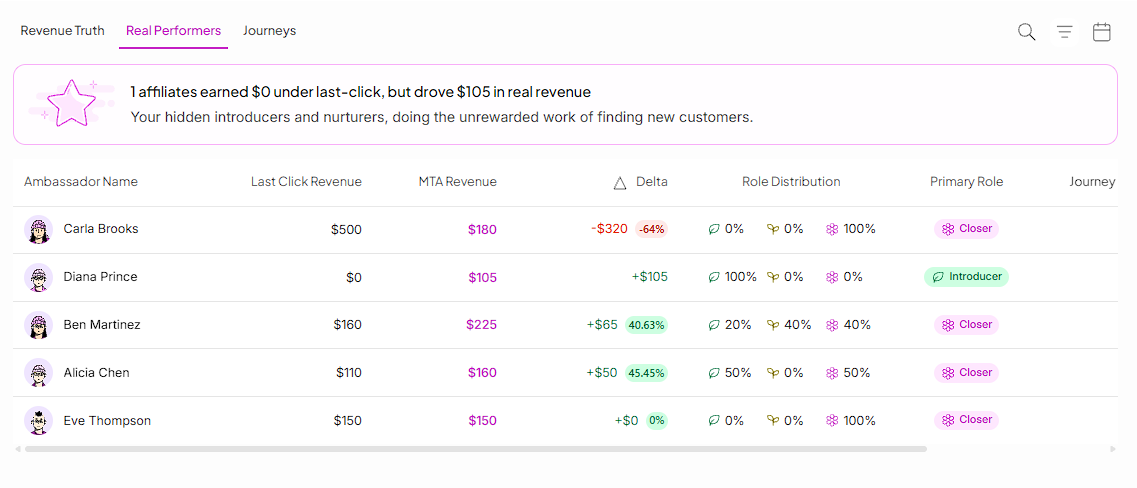
At the top of the tab, a banner highlights ambassadors who earned $0 under last-click but drove real revenue under multi-touch attribution.
The Ambassador Table
Below the callout, every ambassador in your program is listed with their revenue under both models.
Columns in the table:
Ambassador Name — the ambassador's name or handle.
Last Click Revenue — Revenue by way of last click attribution only.
MTA Revenue — attributed revenue under the active multi-touch model.
Delta — the dollar and percentage change from last-click to multi-touch. A positive delta (shown in green) means the ambassador is gaining credit under multi-touch. A negative delta (shown in red) means they were previously over-credited by last-click.
Role Distribution — the split of Introducer, Nurturer, and Closer touchpoints for that ambassador, shown as a set of small icons with percentages.
Primary Role — the role the ambassador plays most often. This is based on whichever role they appear in across the most journeys, not a simple majority within a single journey.
Journey Influence — the percentage of total customer journeys this ambassador appeared in.
Survey Mentions — the number of times customers named this ambassador in a post-purchase survey. This is a supplementary signal, not something that changes attributed revenue.
Reading a Delta
A large negative delta doesn't mean an ambassador underperformed — it means last-click was crediting them for sales they only closed, not drove. A large positive delta means an ambassador was doing real work — introducing or nurturing customers — that last-click never counted.
Filtering the Table
You can filter by date range, minimum revenue, ambassador role (show only Introducers, only Closers, and so on), and delta direction (show only gainers or only losers).
Still need help?
Reach out anytime to our Support team using the button at the bottom-right corner of your dashboard, or email us at [email protected].