

Journeys is where Prism shows its work. Instead of summary numbers, this tab lists individual orders and the full sequence of ambassador touchpoints that led to each one. This article covers the summary cards, the order table, and how to read an expanded journey.
The Summary Cards
At the top of the tab, four cards summarize journey activity across your program.
Total Orders — the total number of orders in the selected date range.
Multi-Touch Orders — the percentage of those orders that involved two or more ambassador touchpoints.
Avg. Touchpoints — the average number of ambassador touchpoints per journey.
Sales Cycle — the average number of days between the first touchpoint and the purchase.
The Order Table
Below the summary cards, every order is listed with a visual chain showing each ambassador touchpoint in that journey.
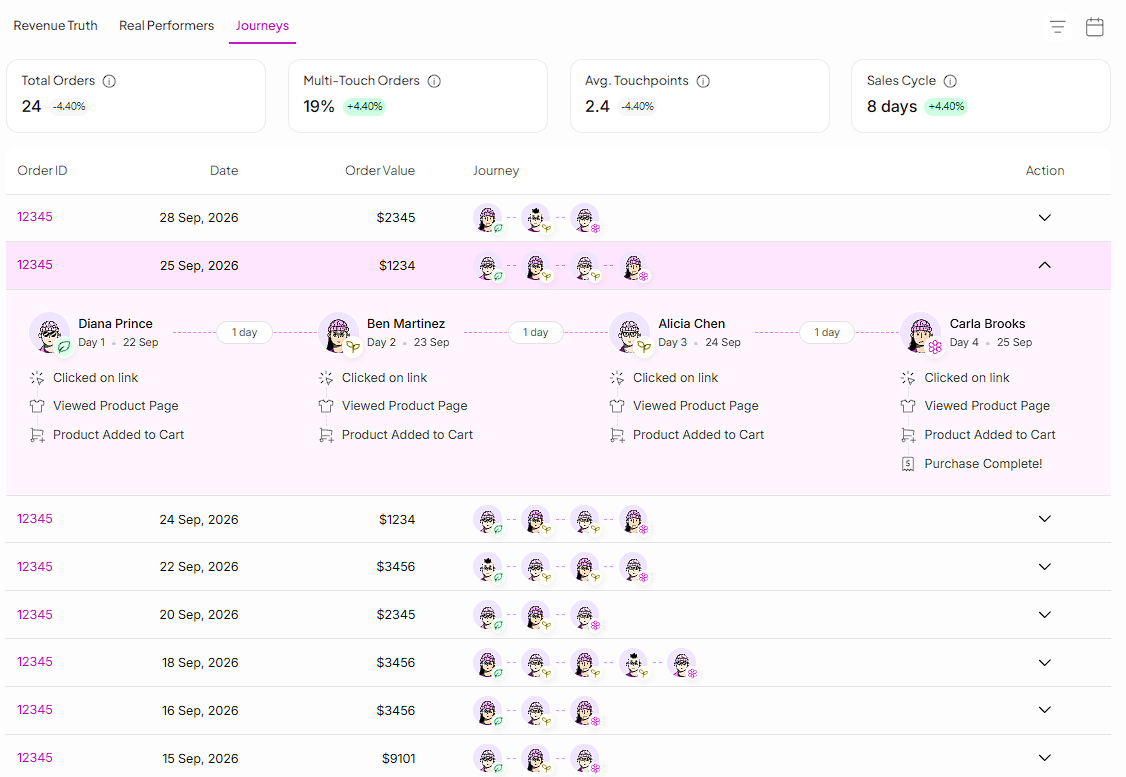
Each avatar in the Journey column represents one ambassador touchpoint, in order. The icon next to each avatar shows that ambassador's role in the journey (Introducer, Nurturer, or Closer).
Expanding a Journey
Click any row to expand the full journey for that order.
The expanded view shows, for each ambassador in the journey:
Their name and role (Introducer, Nurturer, Closer)
The day number and date of their touchpoint
The number of days between their touchpoint and the next one
The specific actions recorded at that touchpoint — link click, product page views, cart additions, and purchase completion on the final touchpoint

Still need help?
Reach out anytime to our Support team using the button at the bottom-right corner of your dashboard, or email us at [email protected].