Shortened links replace long tracking URLs with short, readable ones. Ambassadors can share a cleaner link while the underlying tracking stays intact, and the shortened link still redirects to the correct destination page.
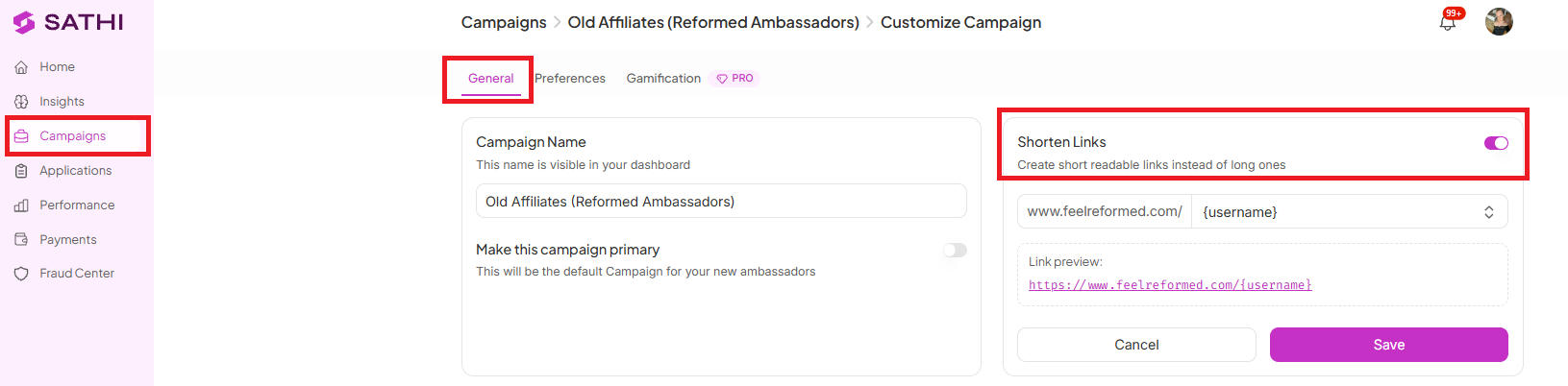
Navigate to Campaigns
Select the campaign you want to update
Go to the General tab
Toggle Shorten Links ON
Once shortened links are enabled, you can choose how an ambassador's link will appear. Available formats are:
Username
First Name
First Name + Last Name
Auto-generated
Ambassador ID

Every new ambassador link created under the selected campaign is automatically converted into a short link. The shortened link remains fully functional and redirects to the correct destination URL without changing how the campaign is tracked.
For example, if the original URL is:
https://www.feelreformed.com/products/collagen-black-coffee?ref=adamosborne
The shortened link would appear as:
FEELREFORMED.COM/ADAM
This still redirects to the original destination page.
Shortened links make it easier for ambassadors to share their links across social media, messaging apps, and in-person conversations, where long URLs are awkward to read or type. A clean, branded-looking link is also more likely to be trusted and clicked by a potential customer, which can improve conversion rates for the campaign.
Still need help?
Reach out anytime to our Support team using the button at the bottom-right corner of your dashboard, or email us at [email protected].