Boosted Commission lets you raise a commission tier's rate for a fixed period. When the boost ends, SATHI automatically reverts the tier to its normal base commission, so there is nothing to reset manually.
Boosted Commission is set from the Edit Commission Tier modal in a campaign's settings. You can boost any tier in the campaign, not just the Primary tier.
Open the campaign's settings and open the Edit Commission Tier modal for the tier you want to boost.
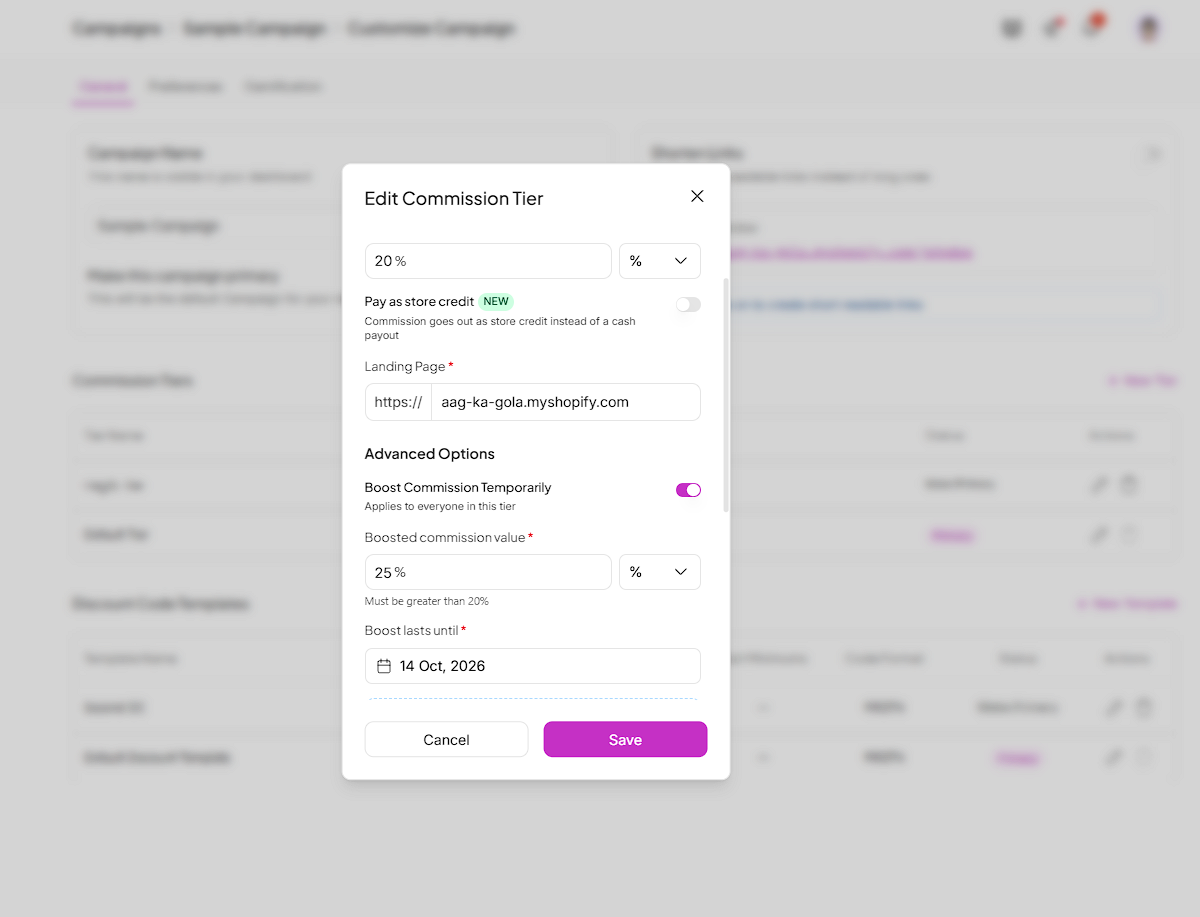
Check Boost commission.
Enter the boosted commission value. It must be higher than the tier's current base commission.
Select an end date for the boost. The date must be in the future.
Click Save.
The boosted rate applies immediately to every ambassador in that tier.

Once you save, SATHI does the following:
Every ambassador currently in the tier receives an email with their boosted rate, their base rate, and the date the boost ends.
A notification appears in your notification center confirming the boost is live, with the boosted rate and the days remaining.
Ambassadors who join the campaign while a boost is active receive the boosted rate immediately and get the same email.
While a boost is active, the tier's Base Commission Value field is read-only. You can edit it again once the boost ends or is cancelled.

At the end date, the tier's commission automatically returns to its base commission value, Boost commission is unchecked, and the base commission field unlocks.
If you cancel a boost before its end date, the commission returns to the base value immediately and the field unlocks.
Boosts are not retroactive. Orders attributed before the boost started keep the commission rate they were attributed at. Only orders attributed during the boost earn the boosted rate.
Still need help?
Reach out anytime to our Support team using the button at the bottom-right corner of your dashboard, or email us at [email protected].