Paying commissions on fraudulent or returned orders is one of the biggest ways brands lose money on ambassador programs. SATHI's fraud protection runs automatically in the background. Here's exactly what it does and what you can control.
The moment a commission is created, it passes through SATHI's fraud engine before it ever becomes payable. Here's what gets caught:
Self-Referrals: If an ambassador uses their own link or discount code to make a purchase, SATHI detects the email match and rejects the commission instantly. It never reaches payout and doesn't require any action from you.
Return Window Protection: Every commission is held during your return window (default: 14 days). If the order is refunded during that window, the commission is automatically voided. Once the window closes with no refund, the commission becomes payable. You can set the return window for your store from Settings → Preferences.
Multi-Identity Detection: Catches ambassadors who try to bypass self-referral checks using similar email addresses, shared billing addresses, or the same IP address across multiple orders. If signals match, the commission is flagged for review.
Code Leak Detection: SATHI scans for your discount codes appearing on coupon sites and browser extensions like Honey. When a code is used by someone who clearly didn't come through an ambassador's link, SATHI flags it so you're not paying commission on a sale the ambassador had nothing to do with.
Geo Traffic Flood Detection: Flags unusual spikes in traffic coming from the same geographic location, a common signal of artificial click inflation designed to game your program metrics.
Paid Ads Signal Detection: Detects when ambassadors are running paid ads using your brand name or terms, which violates most program policies. These get surfaced so you can take action.
Fraud Scan on Onboarding: SATHI scans your past 90 days of Shopify store data after installation, checking for prior fraud such as code leaks, self-referrals, geo traffic anomalies, or paid ads signals.
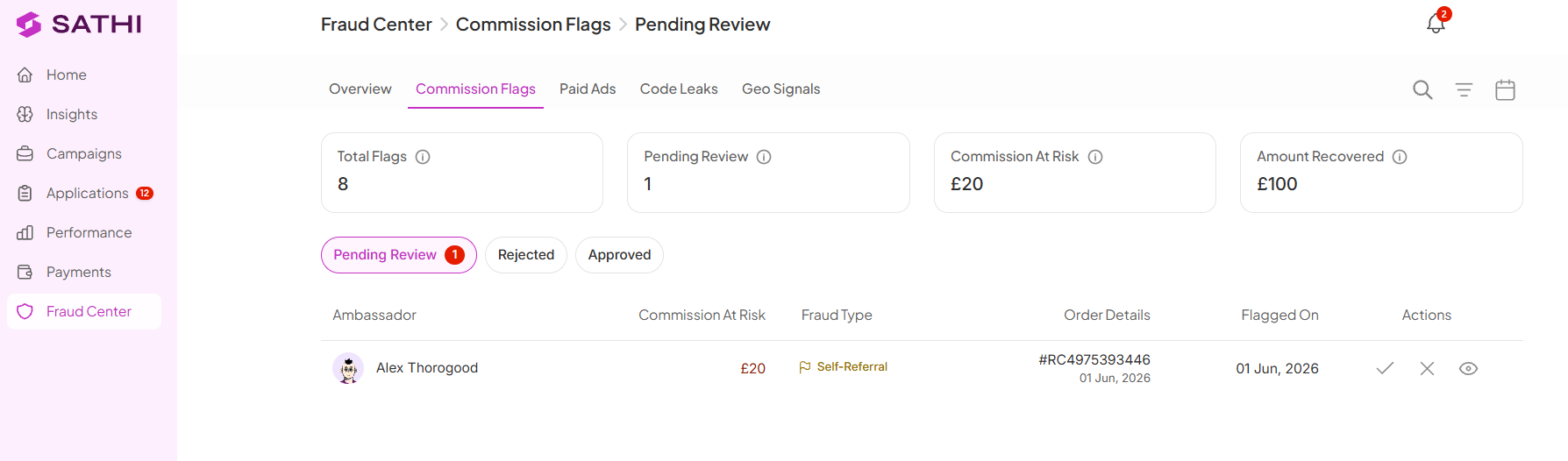
Some commissions require your manual review before payout. These appear under Commission Flags in the Fraud Center.
From the review panel you can:
Approve a commission for payout
Reject it permanently
Filter by flag type, or sort by amount, date, or risk level
Go to Settings → Preferences → Return Window & Fraud Rules to adjust:
Return Window: How many days SATHI holds commissions before they become payable. Default is 14 days.
Minimum Payout Threshold: Commissions below this amount sit on hold until the ambassador's total balance meets the threshold.
Not all fraud features are available on every plan.
Available on all plans (Ember and above):
Self-referral detection
Return window protection
Clawbacks
High-risk order flagging
Manual dispute handling
Available on Blaze and Wildfire only:
Multi-Identity Detection
Code Leak Detection
Geo Traffic Flood Detection
Paid Ads Signal Detection
Fraud Scan on Onboarding
See SATHI's pricing plans for more detail.
See the Help Center articles on getting started with SATHI and affiliate links & discount codes for next steps.
Fraud protection runs before a commission ever reaches payout, so you're not chasing down refunds or clawing back payments after the fact. Because most checks (self-referrals, return windows, code leaks) happen automatically, you only need to step in for the small number of cases that genuinely require judgment, rather than reviewing every commission manually.
Still need help?
Reach out anytime to our Support team using the button at the bottom-right corner of your dashboard, or email us at [email protected].

