Welcome to SATHI, your affiliate marketing companion. This guide walks you through the setup steps to get your program running end to end — ambassadors onboarded, integrations connected, and fraud protection on.
A campaign is where everything lives — your commission structure, discount codes, referral links, gamification, and the ambassadors tied to them. You need at least one campaign before anything else in SATHI will work.
See our guide on setting up your affiliate program below:
Set Up Your Affiliate Program
Affiliate Program Setup Guide
There are three ways to bring ambassadors into a campaign:
Invite them directly. Open the campaign and click the pink Invite button.
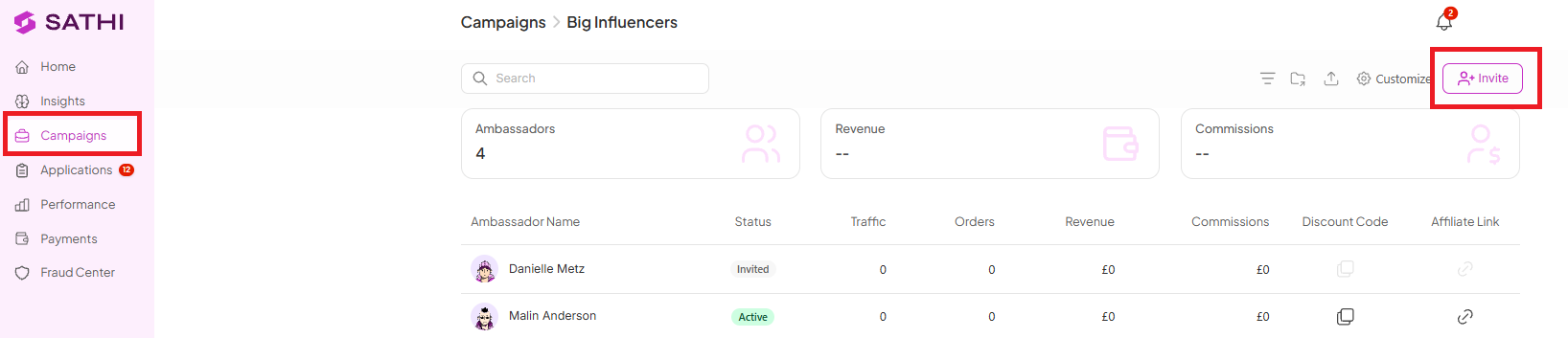
Import existing ambassadors via CSV if you're switching from another tool. See our guide on importing existing ambassadors into SATHI below.
How to Import Existing Affiliates into SATHI
Bring existing affiliate information into SATHI
Let them apply. Use an application form — covered in Step 3 below.
An application form can go on your website, in an email, or in your link in bio. Interested people fill it out; once you review and approve an application, SATHI automatically creates their links and codes and sends a gift if one is set up.
See our guide on creating an application form below.
How to Create an Affiliate Application Form
Creating an Affiliate Application Form
Once Klaviyo is connected, every ambassador's links, codes, and activity sync in automatically, so you can trigger flows based on how they're performing.

How to Connect Klaviyo
How to Connect Klaviyo
Inner Circle gives your best customers a personal referral link and discount code right after checkout. There are no extra steps for the customer and no manual work on your end.
How to Set Up Inner Circle
How Inner Circle Works
Set milestones — like $500 in sales — and attach rewards such as cash bonuses, free products, or a tier upgrade. SATHI tracks progress and applies rewards automatically.
How to Set Up Milestone Rewards and Gamification
Milestone Rewards & Gamification: Setup Guide
The post-purchase survey asks customers "how did you hear about us?" on the thank you page, capturing sales that links and codes don't get credit for. Setup takes one click, and the questions are pre-written.
How to Set Up a Post-Purchase Survey in SATHI
Learn how to set up a post-purchase survey in SATHI to collect customer feedback after checkout.
SATHI’s Fraud Center scans for leaked codes, self-referrals, geo traffic mismatches, paid ads, and browser extension injections in the background.

How Fraud Protection Works in SATHI
A guide to how SATHI’s fraud protection works in the background to prevent unnecessary commission payouts.
Pay ambassadors by bank transfer, PayPal, gift card, or any other supported method — all through SATHI Wallet.
How to Set Up Affiliate Payments
A simple guide to setting up affiliate payments and managing payout settings.
Still need help?
Reach out anytime to our Support team using the button at the bottom-right corner of your dashboard, or email us at [email protected].

