SATHI keeps a single ambassador profile per creator in your ambassador program. When a creator ends up with two profiles, or a new application matches someone already in your program, you can merge the duplicate into the original. Merging can be started from an ambassador's profile or from the application approval tab, and it consolidates both accounts into one active record.
Open the ambassador's profile, search for the duplicate ambassador, and merge it with the current/active one.

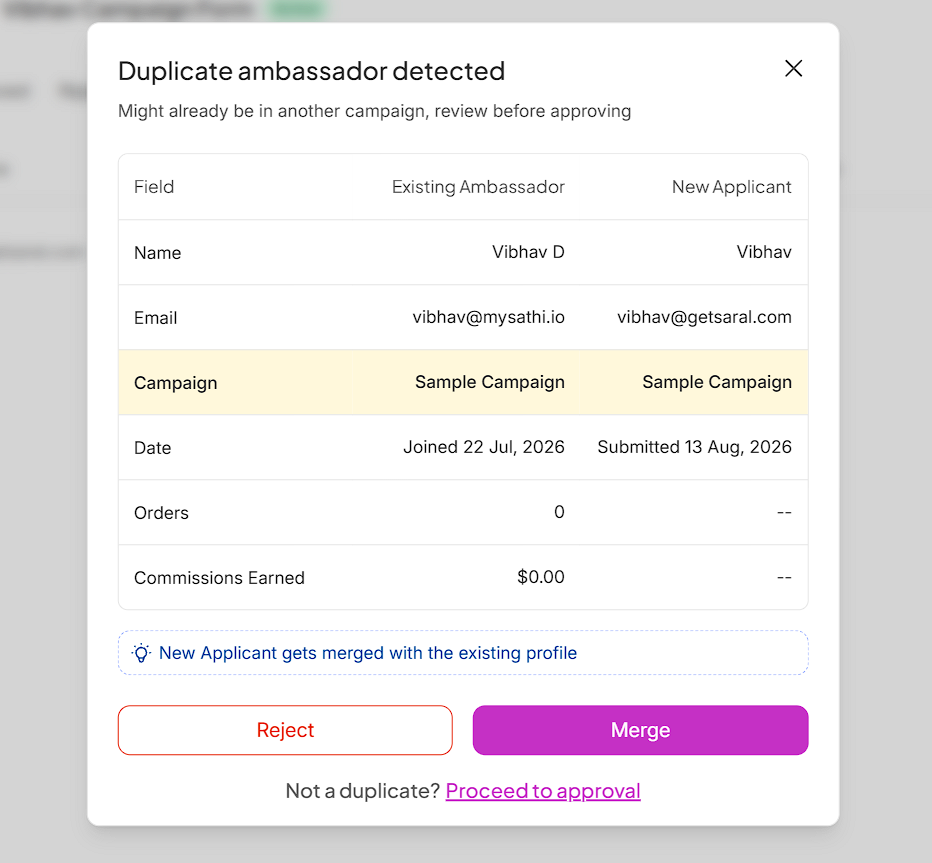
When a new application looks like it may belong to an existing ambassador, SATHI flags it as a potential duplicate on the application approval tab. From there, you can:
Reject the application
Merge the two profiles
Dismiss the flag if it's not actually a duplicate
Learn more about the ambassador application here: How to Create an Ambassador Application Form | SATHI
The ambassador you keep is the Active Ambassador. The duplicate being merged in is the Merged Ambassador.

The Merged Ambassador's activity logs are appended to the Active Ambassador's history.
The Active Ambassador's account stays in its current campaign. The Merged Ambassador's revenue and commission metrics are added to the Active Ambassador's totals.
All pending, past, upcoming, and on-hold payments move from the Merged Ambassador's account to the Active Ambassador's account.
Product shipments on the Merged Ambassador's account no longer exist after the merge. To send a product, use the Active Ambassador's account instead.
Automated shipments on the Merged Ambassador's account no longer exist after the merge. Set up automated shipments again on the Active Ambassador's account if needed.
Revenue Truth: The Merged Ambassador's metrics are absorbed into the Active Ambassador's.
Real Performers: The Merged Ambassador no longer appears.
Journeys: Touchpoints previously attributed to the Merged Ambassador are reattributed to the Active Ambassador.
The Merged Ambassador is no longer discoverable in Sidekick. Since its other metrics have already moved to the Active Ambassador, only the Active Ambassador and its activity appear going forward.
Fraud metrics and flags tied to the Merged Ambassador do not appear in the Fraud Center after the merge.
Duplicate ambassador profiles split a single creator's performance across two records, which understates their real revenue and commission contribution and can lead to duplicate payouts. Merging keeps campaign metrics, gamification progress, and fraud history tied to one accurate profile per creator, so your reporting and payouts reflect what each ambassador actually did.
Still need help?
Reach out anytime to our Support team using the button at the bottom-right corner of your dashboard, or email us at [email protected].