A custom prefix adds your brand name, or any short text you choose, to the start of every discount code generated from a template. Use it to strengthen your branding or to create codes for a specific campaign or launch. It works with the FIRSTNAME, USERNAME, and FN+LN code formats, and the prefix stays locked even when ambassadors are allowed to edit their own codes.
Prefixes are available only for templates using one of these code formats:
FIRSTNAME
USERNAME
FN+LN
If you select any other code format, the Add a prefix toggle is disabled. Prefixes cannot be used with LeakProof codes.
Open your campaign and go to the General tab.
Scroll to Discount Code Templates.
Click + New Template to create a template, or click the pencil icon under Actions to edit an existing one.
Under Code Format, select FIRSTNAME, USERNAME, or FN+LN.
Turn on the Add a prefix toggle.
Enter your prefix in the text field, for example "SATHI".
Click Save.
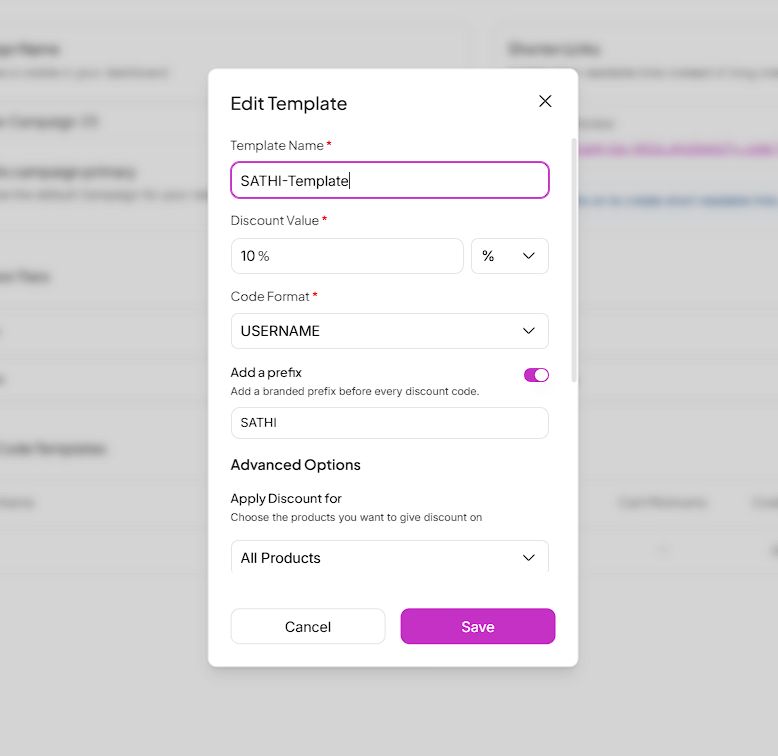

Each code is made up of two parts: your prefix, followed by the name-based part from the selected code format. For example, with the prefix "SATHI" and the USERNAME format, every ambassador's code starts with SATHI and ends with their username.
You can switch between FIRSTNAME, USERNAME, and FN+LN without losing your prefix. The prefix stays the same, and only the name-based part of the code changes.
Changing or clearing a prefix does not update codes that have already been generated. Existing codes keep their old prefix, or no prefix if none was set.
New codes pick up the current prefix. This includes codes created from the ambassador dashboard and codes created through bulk actions.
[callout: warning]

How to Bulk Update Commission Tiers & Discount Codes in Seconds
A guide to updating Commission Tiers and Discount Code values for multiple ambassadors at once from the Campaigns section in SATHI, useful when preparing for a new campaign, promotion, or seasonal sale.
If this feature is turned on for your campaign, ambassadors can still edit their codes, but the prefix is locked. Ambassadors see the prefix as a separate, non-editable part of the code and can only change the name-based part, within the existing editing rules. See our guide on letting ambassadors edit discount codes.
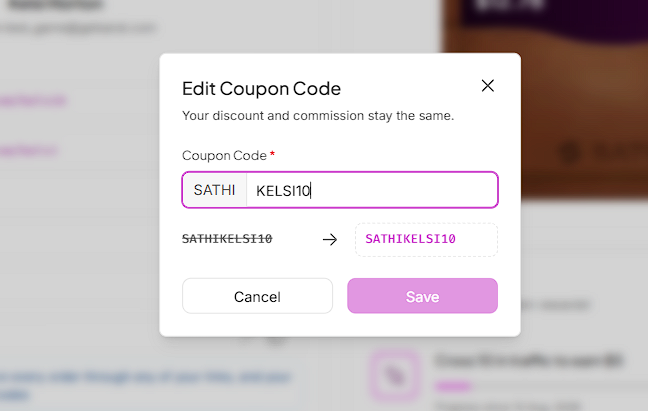
Every code an ambassador shares carries your brand name, so customers see who the discount comes from before they reach checkout. Codes stay consistent across your whole ambassador program, and because the prefix is locked, ambassadors cannot remove or change it when editing their codes.
Still need help?
Reach out anytime to our Support team using the button at the bottom-right corner of your dashboard, or email us at [email protected].