This setting lets ambassadors change their own discount codes from their dashboard. Use it to give ambassadors codes that suit their audience while keeping control of the discount and commission you set. Ambassadors can make one edit every 14 days.
Code editing is set inside a discount code template and applies to the commission tier using that template.
Open your campaign and go to the General tab.
Scroll to Discount Code Templates.
Click + New Template to create a template, or click the pencil icon under Actions to edit an existing one.
Scroll to Advanced Options.
Turn on the Allow ambassador to edit codes toggle.
Click Save.
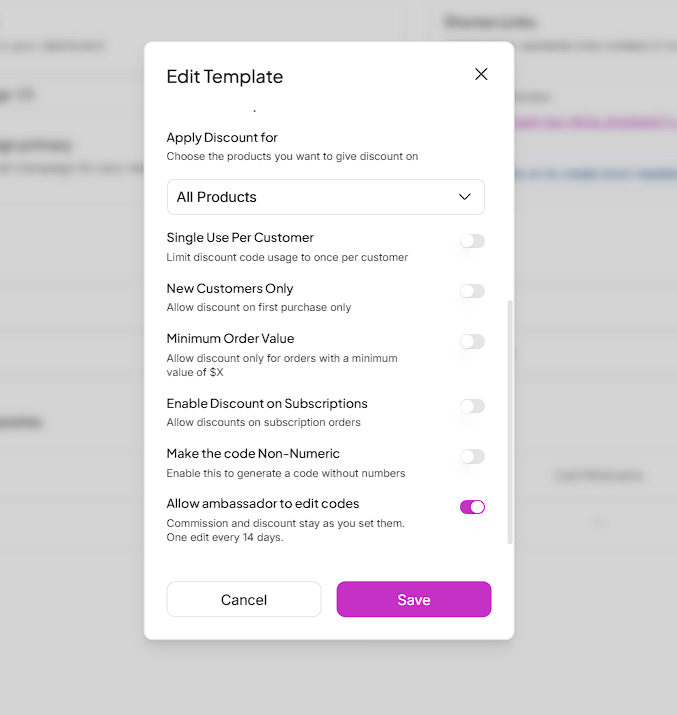
If you turn on code editing while creating a new template, every code generated from that template is editable from the start.
If you turn it on for an existing template, codes that have already been generated are not updated. Only codes added, updated, or created for ambassadors in that template after you save become editable.
To make existing codes editable, bulk update or create new codes for the ambassadors in that template. See our guide on how to do so below.
How to Bulk Update Commission Tiers & Discount Codes in Seconds
A guide to updating Commission Tiers and Discount Code values for multiple ambassadors at once from the Campaigns section in SATHI, useful when preparing for a new campaign, promotion, or seasonal sale.
Ambassadors can change only the text of their code. The discount value and commission stay exactly as you set them.
If the template uses a custom prefix, the prefix is locked. Ambassadors see it as a separate, non-editable part of the code and can only change the part after it. See our guide on adding a custom prefix to discount codes.
How to Add a Custom Branded Prefix to Discount Codes
Learn how to add a branded prefix to ambassador discount codes in SATHI, which code formats support it, and what happens to existing codes when you add, change, or remove a prefix.
In their dashboard, ambassadors go to Your Discount Codes.
They click the pencil icon next to the code they want to change.
In the Edit Coupon Code window, they enter the new code. A preview shows the old code next to the new one.
They click Save.
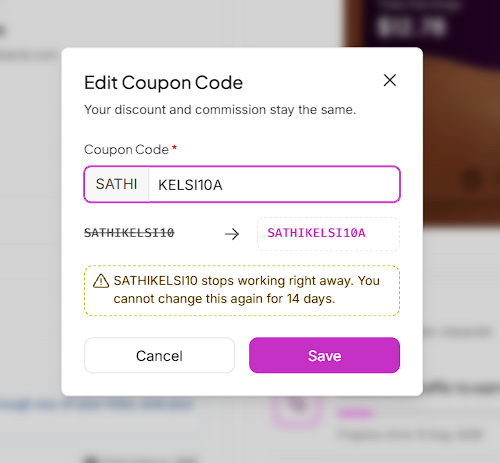

After an ambassador saves an edit, that code cannot be changed again for 14 days. The edit option is blocked on the ambassador's dashboard until the 14 days have passed.
The updated code appears in both the ambassador's dashboard and your brand dashboard, so you can always see the code each ambassador is currently using.

Ambassadors can shape their own codes without asking you for every change, so you can offer that flexibility across your whole program without handling individual requests. Discount and commission stay fixed, the 14-day limit prevents frequent changes, and SATHI keeps tracking and checking for fraud on every edited code.
Still need help?
Reach out anytime to our Support team using the button at the bottom-right corner of your dashboard, or email us at [email protected].